
The Gemini Live API enables real-time, bidirectional voice conversations with Gemini models.
Standard voice models work well for immediate back-and-forth dialogue. You speak to the model, and it generates a spoken reply right away. But when a request requires planning, complex analysis, or external tools, direct responses hit a limit. The model must either answer without reasoning or pause silently while waiting for tools to finish.
Thinking in the Live API (gemini-3.8-live-extended-thinking) adds background
reasoning to real-time voice sessions. The model plans and calls asynchronous
tools in the background while speaking natural conversational fillers to keep
the interaction active.
This architecture changes the conversational lifecycle in two key ways:
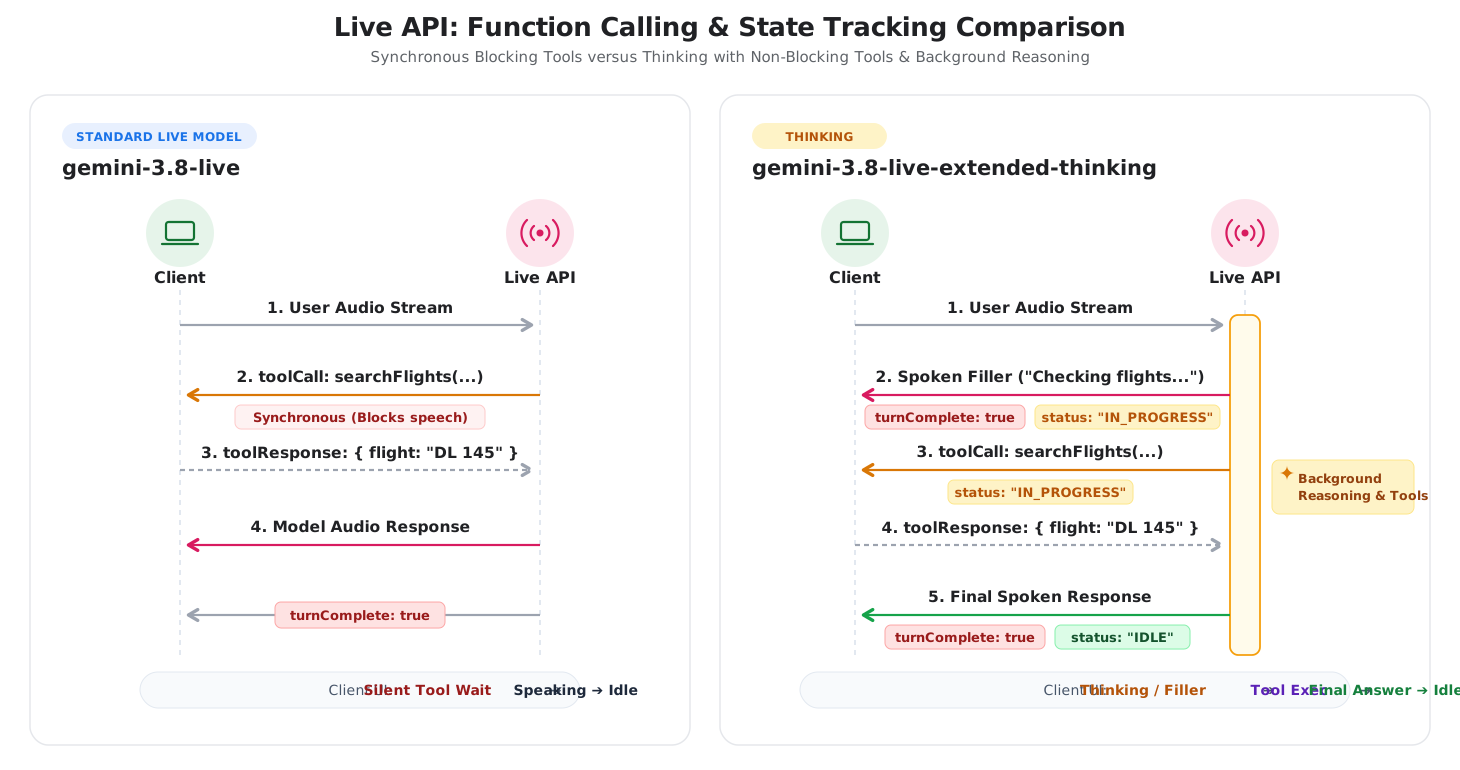
- Conversational fillers: The model speaks intermediate updates (such as "Checking flight options now") while executing tools in the background.
- Interaction status tracking: Because the model can speak multiple times
during a single request, the server emits
interaction_status: "IN_PROGRESS"during background processing andinteraction_status: "IDLE"when the overall task completes.
The following diagram compares the interaction lifecycles between standard Live voice sessions and Thinking with background reasoning:
Choosing the right model
When deciding between gemini-3.8-live and gemini-3.8-live-extended-thinking,
weigh three main considerations: response latency, task complexity, and client
state handling.
When to use Gemini 3.8 Live
Use gemini-3.8-live for low-latency conversational voice agents where
immediate turn-taking is essential and tasks are direct.
- Conversational voice assistants: Customer service triage, language practice, voice search, and interactive storytelling.
- Fast tool execution: Workflows where external tools return within milliseconds (such as reading sensor values or controlling smart devices).
- Simple client logic: Applications where each user turn receives a single
model response, and
turnComplete: truereliably signals when the session is idle.
When to use Gemini 3.8 Live Extended Thinking
Use gemini-3.8-live-extended-thinking when your agent must evaluate complex
data, plan multiple steps, or handle tools that take several seconds to run.
- Multi-step diagnostics and support: Technical support agents diagnosing system issues across multiple logs, error codes, and configuration checks.
- Coordinated data retrieval: Travel and booking agents that search flights, query hotels, and compare prices across parallel API calls.
- STEM and code tutoring: Educational agents that verify formulas, debug code, or work through multi-step logic before speaking an explanation.
- Masking tool latency: Voice experiences where long-running functions would otherwise create awkward silence for the listener.
Key differences summary
The following table summarizes the technical differences between both models:
| Feature | Gemini 3.8 Live | Gemini 3.8 Live Extended Thinking |
|---|---|---|
| Primary use cases | Low-latency voice agents, direct commands, fast tools | Multi-step problem solving, complex planning, multi-tool workflows |
| Model endpoint | gemini-3.8-live |
gemini-3.8-live-extended-thinking |
| Reasoning architecture | Interleaved reasoning with fixed latency profile (thinking_level not supported) |
Configurable background reasoning (thinking_level: low, medium, high; MINIMAL not supported) |
| Turn boundaries | turnComplete: true closes the turn and returns to idle |
turnComplete: true finishes an utterance; interaction_status controls session lifecycle |
| Conversational fillers | Model waits for tool execution before speaking | Model streams intermediate conversational fillers while processing |
| Tool execution | Supports synchronous (BLOCKING) and asynchronous (NON_BLOCKING) tools |
Requires asynchronous (NON_BLOCKING) tool declarations |
Migration and integration paths
Follow these steps to upgrade existing voice applications or integrate Thinking into your Live API sessions.
Upgrading from Gemini 3.1 Flash Live
For existing voice applications using gemini-3.1-flash-live-preview, upgrading
to gemini-3.8-live requires updating the model string and omitting
thinking_level (or thinking_config) from your setup configuration, as
thinking_level is not supported for gemini-3.8-live:
{
  "setup": {
    "model": "models/gemini-3.8-live"
  }
}
The turn lifecycle and turnComplete signals remain identical.
Adopting Thinking
To adopt gemini-3.8-live-extended-thinking, update three integration points:
Track
interaction_statusinstead ofturnComplete: In Thinking sessions, the model can emit intermediate conversational fillers while reasoning. Inspect theinteraction_statusfield on incoming server messages to manage UI state. Only return to idle wheninteraction_statusisIDLE.Python
status = getattr(message, "interaction_status", None)
if status == "IDLE":
    # Ready for user input
    set_ui_state("listening")
elif status == "IN_PROGRESS":
    # Reasoning or executing tools
    set_ui_state("thinking")
JavaScript
if (message.interactionStatus === 'IDLE') {
  // Ready for user input
  setUiState('listening');
} else if (message.interactionStatus === 'IN_PROGRESS') {
  // Reasoning or executing tools
  setUiState('thinking');
}
Declare non-blocking functions: Set
"behavior": "NON_BLOCKING"on all function declarations. Thinking models run tools asynchronously in the background while streaming verbal updates. Synchronous blocking tools return an error.Python
search_flights = types.FunctionDeclaration(
    name="search_flights",
    description="Searches for available flights.",
    behavior="NON_BLOCKING",
    parameters={
        "type": "OBJECT",
        "properties": {
            "destination": {"type": "STRING"},
        },
        "required": ["destination"],
    },
)
JavaScript
const searchFlights = {
  name: 'search_flights',
  description: 'Searches for available flights.',
  behavior: 'NON_BLOCKING',
  parameters: {
    type: 'OBJECT',
    properties: {
      destination: { type: 'STRING' },
    },
    required: ['destination'],
  },
};
Configure reasoning depth: Set
thinking_configin your session configuration to adjust reasoning levels (low,medium, orhigh;MINIMALis not supported).Python
config = types.LiveConnectConfig(
    response_modalities=["AUDIO"],
    thinking_config=types.ThinkingConfig(
        thinking_level="low",
    ),
    tools=[types.Tool(function_declarations=[search_flights])],
)
JavaScript
const config = {
  responseModalities: [Modality.AUDIO],
  thinkingConfig: {
    thinkingLevel: 'low',
  },
  tools: [{ functionDeclarations: [searchFlights] }],
};
Protocol side-by-side comparison
This section compares the WebSocket messages exchanged during each phase of a Live API session.
Step 1: Session setup
Both models connect to the same WebSocket endpoint:
wss://generativelanguage.googleapis.com/ws/google.ai.generativelanguage.v1alpha.GenerativeService.BidiGenerateContent?key=$API_KEY
- Identical: WebSocket URL and API key authentication.
- Model string:
gemini-3.8-liveversusgemini-3.8-live-extended-thinking. - Thinking configuration: Thinking adds
thinkingConfigto adjust reasoning depth. Tool behavior: Thinking requires
"behavior": "NON_BLOCKING"on function declarations.
Gemini 3.8 Live
{
  "setup": {
    "model": "models/gemini-3.8-live",
    "generationConfig": {
      "responseModalities": ["AUDIO"],
      "speechConfig": {
        "voiceConfig": {
          "prebuiltVoiceConfig": {
            "voiceName": "Puck"
          }
        }
      }
    }
  }
}
Gemini 3.8 Live Extended Thinking
{
  "setup": {
    "model": "models/gemini-3.8-live-extended-thinking",
    "generationConfig": {
      "responseModalities": ["AUDIO"],
      "speechConfig": {
        "voiceConfig": {
          "prebuiltVoiceConfig": {
            "voiceName": "Puck"
          }
        }
      },
      "thinkingConfig": {
        "thinkingLevel": "LOW"
      }
    },
    "tools": [{
      "functionDeclarations": [{
        "name": "searchFlights",
        "description": "Searches for flights between cities.",
        "behavior": "NON_BLOCKING",
        "parameters": {
          "type": "OBJECT",
          "properties": {
            "destination": { "type": "STRING" }
          },
          "required": ["destination"]
        }
      }]
    }]
  }
}
Both models receive the same server acknowledgment upon connection:
{
  "setupComplete": {}
}
Step 2: User audio input
Audio streaming is identical across both models. Real-time 16kHz raw PCM audio
chunks are streamed using realtimeInput:
{
  "realtimeInput": {
    "audio": {
      "data": "UklGRiQAAABXQVZF...",
      "mimeType": "audio/pcm;rate=16000"
    }
  }
}
Step 3: Model response and state lifecycle
Both models stream 24kHz PCM audio chunks in serverContent.modelTurn. However,
lifecycle management differs:
Gemini 3.8 Live response flow
- The server streams audio chunks for the turn.
- The server sends
turnComplete: true, indicating the model is finished speaking and the session is idle.
// 1. Audio stream chunks
{
  "serverContent": {
    "modelTurn": {
      "parts": [
        {
          "inlineData": {
            "mimeType": "audio/pcm;rate=24000",
            "data": "..."
          }
        }
      ]
    }
  }
}

// 2. Turn completion -> Signals client to switch UI to Idle/Listening
{
  "serverContent": {
    "turnComplete": true
  }
}
Gemini 3.8 Live Extended Thinking response flow
- Spoken filler: The model emits intermediate speech (such as
"Checking flights to Seattle...") with
turnComplete: trueandinteractionStatus: "IN_PROGRESS". - Asynchronous tool call: The server emits the tool call while
interactionStatusremains"IN_PROGRESS", indicating that the server is actively processing the multi-step turn and waiting for the tool response. - Tool response: The client executes the function and returns the output.
- Final response: The server delivers the complete answer with
turnComplete: trueandinteractionStatus: "IDLE".
// 1. Spoken verbal filler while background reasoning proceeds
{
  "serverContent": {
    "modelTurn": {
      "parts": [
        {
          "inlineData": {
            "mimeType": "audio/pcm;rate=24000",
            "data": "..."
          }
        }
      ]
    },
    "turnComplete": true,
    "interactionStatus": "IN_PROGRESS"
  }
}

// 2. Asynchronous tool call emitted with IN_PROGRESS status
{
  "toolCall": {
    "functionCalls": [
      {
        "id": "call_123",
        "name": "searchFlights",
        "args": {
          "destination": "Seattle"
        }
      }
    ]
  },
  "interactionStatus": "IN_PROGRESS"
}

// 3. Client executes function and returns result
{
  "toolResponse": {
    "functionResponses": [
      {
        "response": {
          "output": {
            "flight": "DL 145",
            "price": "$145"
          }
        },
        "id": "call_123"
      }
    ]
  }
}

// 4. Final spoken answer delivered -> session transitions to IDLE when done
{
  "serverContent": {
    "modelTurn": {
      "parts": [
        {
          "inlineData": {
            "mimeType": "audio/pcm;rate=24000",
            "data": "..."
          }
        }
      ]
    },
    "interactionStatus": "IDLE",
    "turnComplete": true
  }
}
SDK implementation examples
The following examples show how to configure Thinking and handle
interaction_status using the Google GenAI SDK.
Python
import asyncio
from google import genai
from google.genai import types

client = genai.Client()
model = "gemini-3.8-live-extended-thinking"

# Define non-blocking function declaration
search_flights = types.FunctionDeclaration(
    name="search_flights",
    description="Searches for available flights to a destination.",
    behavior="NON_BLOCKING",
    parameters={
        "type": "OBJECT",
        "properties": {
            "destination": {"type": "STRING"}
        },
        "required": ["destination"]
    }
)

config = types.LiveConnectConfig(
    response_modalities=["AUDIO"],
    thinking_config=types.ThinkingConfig(
        thinking_level="low"
    ),
    tools=[types.Tool(function_declarations=[search_flights])]
)

async def main():
    async with client.aio.live.connect(model=model, config=config) as session:
        print("Session connected with Thinking")

        async for message in session.receive():
            # Inspect interaction status for server lifecycle tracking
            status = getattr(message, "interaction_status", None)
            if status:
                print(f"Interaction status: {status}")

            # Handle audio output parts
            if message.server_content and message.server_content.model_turn:
                for part in message.server_content.model_turn.parts:
                    if part.inline_data:
                        # Process 24kHz audio chunk
                        pass

            # Handle asynchronous tool call
            if message.tool_call:
                for call in message.tool_call.function_calls:
                    print(f"Executing tool: {call.name}")
                    # Simulate function execution
                    response = types.FunctionResponse(
                        id=call.id,
                        name=call.name,
                        response={"result": "Flight DL 145 ($145)"}
                    )
                    await session.send_tool_response(
                        function_responses=[response]
                    )

            # Status is IDLE when reasoning and all turns are complete
            if status == "IDLE":
                print("Session is idle and ready for user input.")

if __name__ == "__main__":
    asyncio.run(main())
JavaScript
import { GoogleGenAI, Modality } from '@google/genai';

const ai = new GoogleGenAI({});
const model = 'gemini-3.8-live-extended-thinking';

const searchFlights = {
  name: 'search_flights',
  description: 'Searches for available flights to a destination.',
  behavior: 'NON_BLOCKING',
  parameters: {
    type: 'OBJECT',
    properties: {
      destination: { type: 'STRING' }
    },
    required: ['destination']
  }
};

const config = {
  responseModalities: [Modality.AUDIO],
  thinkingConfig: {
    thinkingLevel: 'low'
  },
  tools: [{ functionDeclarations: [searchFlights] }]
};

async function main() {
  const session = await ai.live.connect({
    model: model,
    config: config,
    callbacks: {
      onopen: () => console.log('Session connected'),
      onmessage: async (event) => {
        const message = JSON.parse(event.data);

        if (message.interactionStatus) {
          console.log(`Interaction status: ${message.interactionStatus}`);
        }

        if (message.toolCall) {
          for (const call of message.toolCall.functionCalls) {
            console.log(`Executing tool: ${call.name}`);
            session.sendToolResponse({
              functionResponses: [{
                id: call.id,
                name: call.name,
                response: { result: 'Flight DL 145 ($145)' }
              }]
            });
          }
        }

        if (message.interactionStatus === 'IDLE') {
          console.log('Session is idle and waiting for input.');
        }
      }
    }
  });
}

main();
What's next
- Read the Gemini 3.8 Live and Gemini 3.8 Live Extended Thinking model pages.
- Check the Model comparison table for detailed feature comparisons across all Live API models.
- Learn more about function calling in the Live API Tool use guide.
- Review Session management to handle session resumption and context lifecycle.