

জেমিনি রোবোটিক্স ইআর (এমবডিড রিজনিং) মডেলগুলো হলো ভিশন-ল্যাঙ্গুয়েজ মডেল (ভিএলএম), যা রোবটকে ভৌত জগৎকে উপলব্ধি করতে এবং তার সাথে মিথস্ক্রিয়া করতে সক্ষম করে। এগুলো দৃশ্যমান তথ্য বিশ্লেষণ করে, স্থানিক ও কালিক যুক্তি সম্পাদন করে, বহু-ধাপের কাজের পরিকল্পনা করে এবং রোবট ও সরঞ্জামসমূহকে সমন্বয় সাধন করে।
মডেল
জেমিনি রোবোটিক্স ER 2 মডেলটি হলো জেমিনি রোবোটিক্সের সর্বাধুনিক মডেল। এটি আমাদের একটি উন্নত রিজনিং মডেল যা রোবটকে তার পরিবেশ নির্ভুলভাবে বুঝতে সক্ষম করে। এটি বিশেষত এমবডিড রিজনিং ক্ষমতায় পারদর্শী, যেমন—রোবটের এজেন্টিক অর্কেস্ট্রেশন (উদাহরণস্বরূপ ভিএলএ ব্যবহার করে), অগ্রগতি বোঝা ও সাফল্য শনাক্তকরণ সহ রোবটের ভিডিও বোঝা, যন্ত্র পাঠ, নির্দেশ করা এবং স্থানিক যুক্তি।
জেমিনি রোবোটিক্স ইআর ২ মডেলে দুটি মডেল এন্ডপয়েন্ট চালু করা হয়েছে:
-
gemini-robotics-er-2-preview: এটি স্ট্যান্ডার্ড ER 2 মডেল। এটি Gemini 3.5 Flash-এর উপর ভিত্তি করে তৈরি এবং এতে উন্নত স্পেশিয়াল রিজনিং, ভিডিও মোমেন্ট ফাইন্ডিং, ভিডিও প্রোগ্রেস ক্লাসিফিকেশন, মাল্টি-রোবট অর্কেস্ট্রেশন এবং মাল্টি-স্টেপ টুল ব্যবহারের মতো বৈশিষ্ট্য রয়েছে। -
gemini-robotics-er-2-streaming-preview: লাইভ এপিআই (Live API) এর মাধ্যমে রিয়েল-টাইম স্ট্রিমিংয়ের জন্য অপ্টিমাইজ করা হয়েছে। কম-লেটেন্সি সম্পন্ন রোবট এজেন্টদের জন্য এই মডেলটি ব্যবহার করুন, যারা অবিচ্ছিন্ন অডিও এবং ভিডিও ইনপুট প্রসেস করে।
আপনি যদি Gemini Robotics ER 1.6 ব্যবহার করে থাকেন, তাহলে আপনার API কলগুলিতে model="gemini-robotics-er-1.6-preview" এর পরিবর্তে model="gemini-robotics-er-2-preview" অথবা model="gemini-robotics-er-2-streaming-preview" করে Gemini Robotics ER 2-তে আপগ্রেড করুন। উল্লেখ্য যে, Gemini Robotics ER 1.6 মডেলটি আগস্ট মাসের শেষে বন্ধ করে দেওয়া হবে।
গুগল এআই স্টুডিওতে জেমিনি রোবোটিক্স ইআর ২ ব্যবহার করে দেখুন।
রোবোটিক্স ক্ষমতা
জেমিনি রোবোটিক্স ইআর বিভিন্ন ধরনের মূর্ত যুক্তিমূলক ক্ষমতা সমর্থন করে। আরও জানতে একটি ক্ষমতা নির্বাচন করুন:
| সক্ষমতা | বর্ণনা | গাইড |
|---|---|---|
| স্থানিক যুক্তি | বস্তু নির্দেশ করুন, ভিডিওতে সেগুলোর গতিপথ অনুসরণ করুন, বাউন্ডিং বক্সের সাহায্যে শনাক্ত করুন, গতিপথ পরিকল্পনা করুন। | স্থানিক যুক্তি |
| সক্রিয় দৃষ্টি | ইমেজ ম্যানিপুলেশন টুল ব্যবহার করে কোড এক্সিকিউশনের মাধ্যমে অন্যান্য সক্ষমতা বৃদ্ধি করুন। | সক্রিয় দৃষ্টি |
| টাস্ক অর্কেস্ট্রেশন | দীর্ঘমেয়াদী কাজ সম্পন্ন করতে স্থানিক যুক্তির সাথে কাস্টম রোবট এপিআই-এর সমন্বয় করুন। | টাস্ক অর্কেস্ট্রেশন |
| স্ট্রিমিং (শুধুমাত্র জেমিনি রোবোটিক্স ইআর ২ স্ট্রিমিং এন্ডপয়েন্টের জন্য) | রিয়েল-টাইম রোবট এজেন্টদের জন্য স্বল্প-বিলম্বের ফাংশন কলিং সহ দ্বিমুখী স্ট্রিমিং। | রোবোটিক্সের জন্য স্ট্রিমিং |
| ভিডিওর অগ্রগতি (শুধুমাত্র জেমিনি রোবোটিক্স ইআর ২ এর জন্য) | ধারাবাহিক ভিডিও ফিড থেকে মুহূর্ত শনাক্তকরণ এবং অগ্রগতির শ্রেণিবিন্যাস। | ভিডিও বোঝা |
শুরু করা হচ্ছে
নিম্নলিখিত উদাহরণটি একটি ছবিতে বস্তু খুঁজে বের করে এবং তাদের নর্মালাইজড ২ডি স্থানাঙ্ক ও লেবেল ফেরত দেয়। রোবটের কার্যকলাপ তৈরি করার জন্য আপনি এই আউটপুটটি সরাসরি একটি রোবোটিক্স এপিআই বা একটি ভিএলএ মডেলে পাঠাতে পারেন।
পাইথন
from google import genai

PROMPT = """
          Point to no more than 10 items in the image. The label returned
          should be an identifying name for the object detected.
          The answer should follow the json format: [{"point": <point>,
          "label": <label1>}, ...]. The points are in [y, x] format
          normalized to 0-1000.
        """
client = genai.Client()

uploaded_file = client.files.upload(file="my-image.png")

image_response = client.interactions.create(
    model="gemini-robotics-er-2-preview",
    input=[
        {
            "type": "image",
            "uri": uploaded_file.uri,
            "mime_type": uploaded_file.mime_type
        },
        {"type": "text", "text": PROMPT}
    ],
    generation_config={"thinking_level": "high"},
)

print(image_response.output_text)
জাভাস্ক্রিপ্ট
import { GoogleGenAI } from "@google/genai";

const PROMPT = `
  Point to no more than 10 items in the image. The label returned
  should be an identifying name for the object detected.
  The answer should follow the json format: [{"point": <point>,
  "label": <label1>}, ...]. The points are in [y, x] format
  normalized to 0-1000.
`;
const client = new GoogleGenAI();

const uploadedFile = await client.files.upload({ file: "my-image.png" });

const imageResponse = await client.interactions.create({
  model: "gemini-robotics-er-2-preview",
  input: [
    {
      type: "image",
      uri: uploadedFile.uri,
      mime_type: uploadedFile.mimeType,
    },
    { type: "text", text: PROMPT },
  ],
  generation_config: { thinking_level: "high" },
});

console.log(imageResponse.output_text);
জাভা
import com.google.genai.Client;
import com.google.genai.gaos.models.interactions.Content;
import com.google.genai.gaos.models.interactions.CreateModelInteraction;
import com.google.genai.gaos.models.interactions.GenerationConfig;
import com.google.genai.gaos.models.interactions.ImageContent;
import com.google.genai.gaos.models.interactions.ImageContentMimeType;
import com.google.genai.gaos.models.interactions.Interaction;
import com.google.genai.gaos.models.interactions.InteractionsInput;
import com.google.genai.gaos.models.interactions.Model;
import com.google.genai.gaos.models.interactions.TextContent;
import com.google.genai.gaos.models.interactions.ThinkingLevel;
import com.google.genai.gaos.models.operations.CreateInteractionRequestBody;
import com.google.genai.types.File;
import com.google.genai.types.UploadFileConfig;
import java.util.List;

Client client = new Client();

String prompt =
    "Point to no more than 10 items in the image. The label returned "
        + "should be an identifying name for the object detected. "
        + "The answer should follow the json format: [{\"point\": <point>, "
        + "\"label\": <label1>}, ...]. The points are in [y, x] format "
        + "normalized to 0-1000.";

File uploadedFile =
    client.files.upload(
        new java.io.File("my-image.png"),
        UploadFileConfig.builder().mimeType("image/png").build());

Content imageContent =
    ImageContent.builder()
        .uri(uploadedFile.uri().orElse(""))
        .mimeType(ImageContentMimeType.of(uploadedFile.mimeType().orElse("image/png")))
        .build();
Content textContent = TextContent.builder().text(prompt).build();

CreateModelInteraction params =
    CreateModelInteraction.builder()
        .model(Model.of("gemini-robotics-er-2-preview"))
        .input(InteractionsInput.ofContent(List.of(imageContent, textContent)))
        .generationConfig(
            GenerationConfig.builder().thinkingLevel(ThinkingLevel.HIGH).build())
        .build();

Interaction imageResponse =
    client.interactions.create(CreateInteractionRequestBody.of(params)).interaction().get();

System.out.println(imageResponse.outputText().orElse(""));
যান
package main

import (
    "context"
    "fmt"
    "log"

    "google.golang.org/genai"
    "google.golang.org/genai/interactions/models/interactions"
    "google.golang.org/genai/interactions/models/operations"
)

func main() {
    ctx := context.Background()
    client, err := genai.NewClient(ctx, nil)
    if err != nil {
        log.Fatal(err)
    }

    prompt := `Point to no more than 10 items in the image. The label returned
should be an identifying name for the object detected.
The answer should follow the json format: [{"point": <point>,
"label": <label1>}, ...]. The points are in [y, x] format
normalized to 0-1000.`

    uploadedFile, err := client.Files.UploadFromPath(ctx, "my-image.png", &genai.UploadFileConfig{
        MIMEType: "image/png",
    })
    if err != nil {
        log.Fatal(err)
    }

    res, err := client.Interactions.Create(ctx, operations.CreateInteractionRequest{
        Body: operations.NewCreateInteractionRequestBody(interactions.CreateModelInteraction{
            Model: interactions.Model("gemini-robotics-er-2-preview"),
            Input: interactions.NewInteractionsInput([]interactions.Content{
                interactions.NewContent(interactions.ImageContent{
                    URI:      genai.Ptr(uploadedFile.URI),
                    MimeType: genai.Ptr(interactions.ImageMimeTypeImagePng),
                }),
                interactions.NewContent(interactions.TextContent{
                    Text: prompt,
                }),
            }),
            GenerationConfig: &interactions.GenerationConfig{
                ThinkingLevel: interactions.ThinkingLevelHigh.ToPointer(),
            },
        }),
    })
    if err != nil {
        log.Fatal(err)
    }
    if res.Interaction.OutputText != nil {
        fmt.Println(*res.Interaction.OutputText)
    }
}
বিশ্রাম
# First, ensure you have the image file locally.
# Encode the image to base64
IMAGE_BASE64=$(base64 -w 0 my-image.png)

curl -X POST \
  "https://generativelanguage.googleapis.com/v1beta/interactions" \
  -H "x-goog-api-key: $GEMINI_API_KEY" \
  -H "Content-Type: application/json" \
  -d '{
    "model": "gemini-robotics-er-2-preview",
    "input": {
      "parts": [
        {
          "inlineData": {
            "mimeType": "image/png",
            "data": "'"${IMAGE_BASE64}"'"
          }
        },
        {
          "text": "Point to no more than 10 items in the image. The label returned should be an identifying name for the object detected. The answer should follow the json format: [{\"point\": [y, x], \"label\": <label1>}, ...]. The points are in [y, x] format normalized to 0-1000."
        }
      ]
    },
    "generation_config": {
      "thinking_config": {
        "thinking_level": "high"
      }
    }
  }'
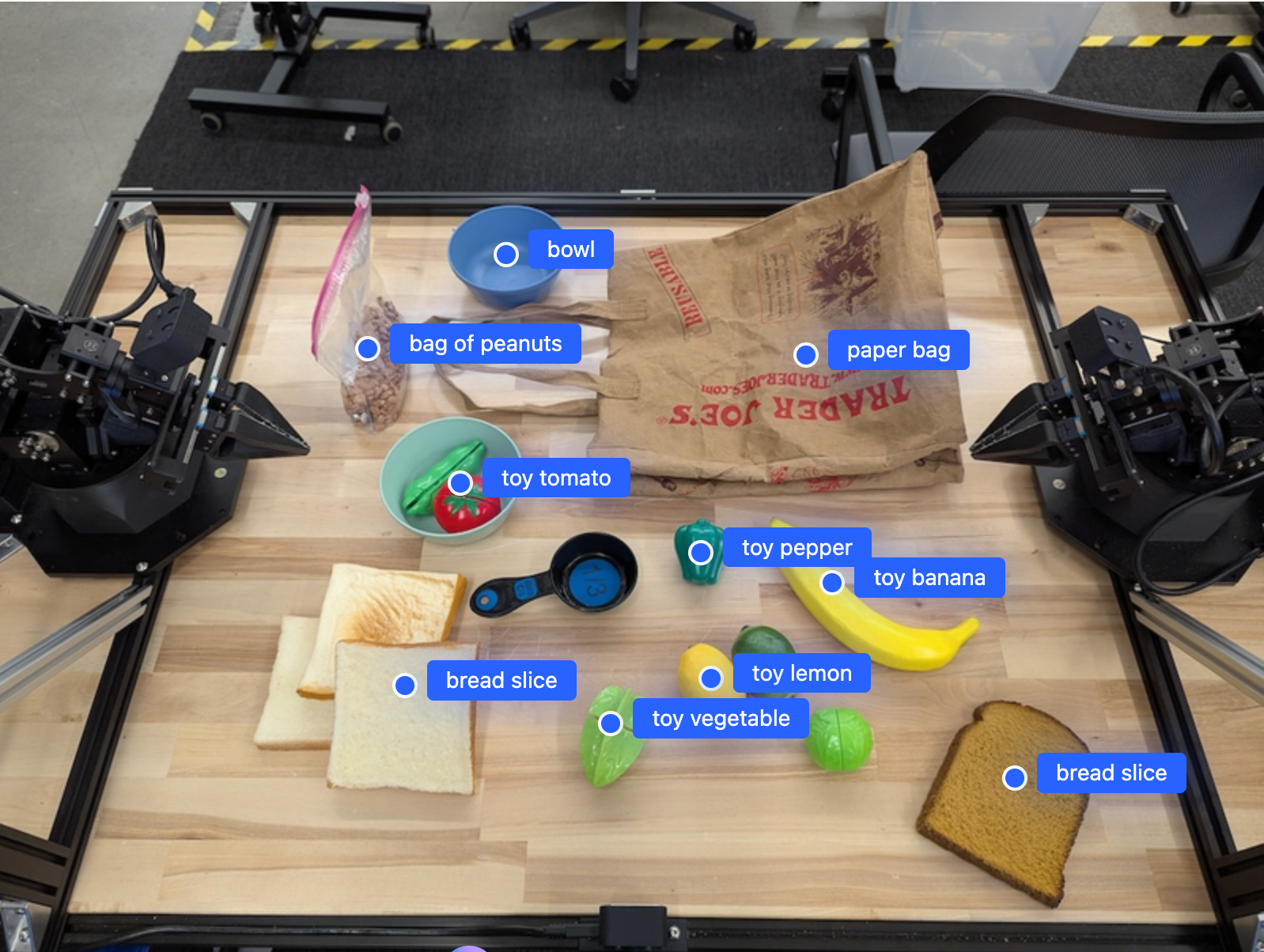
আউটপুটটি একটি JSON অ্যারে হবে, যার মধ্যে অবজেক্ট থাকবে। প্রতিটি অবজেক্টে একটি point (স্বাভাবিককৃত [y, x] স্থানাঙ্ক) এবং অবজেক্টটিকে শনাক্তকারী একটি label থাকবে।
JSON
[
  {"point": [376, 508], "label": "small banana"},
  {"point": [287, 609], "label": "larger banana"},
  {"point": [223, 303], "label": "pink starfruit"},
  {"point": [435, 172], "label": "paper bag"},
  {"point": [270, 786], "label": "green plastic bowl"},
  {"point": [488, 775], "label": "metal measuring cup"},
  {"point": [673, 580], "label": "dark blue bowl"},
  {"point": [471, 353], "label": "light blue bowl"},
  {"point": [492, 497], "label": "bread"},
  {"point": [525, 429], "label": "lime"}
]
নিচের ছবিটি এই পয়েন্টগুলো কীভাবে প্রদর্শন করা যেতে পারে তার একটি উদাহরণ:
এটি কীভাবে কাজ করে
জেমিনি রোবোটিক্স ইআর স্বাভাবিক ভাষার নির্দেশনার মাধ্যমে ছবি, ভিডিও বা অডিও ইনপুট গ্রহণ করে। এটি বস্তু শনাক্ত করে, দৃশ্যের প্রেক্ষাপট ও স্থানিক সম্পর্ক নিয়ে যুক্তি দেয় এবং স্থানাঙ্ক বা বাউন্ডিং বক্সের মতো কাঠামোগত আউটপুট প্রদান করে।
জেমিনি রোবোটিক্স ইআর সক্রিয় ভূমিকাও পালন করে: এটি জটিল কাজগুলোকে ছোট ছোট উপ-কাজে বিভক্ত করে এবং আপনার রোবট ফাংশন কল করে বা জেনারেটেড কোড চালিয়ে সেগুলো সম্পাদন করে। উদাহরণস্বরূপ, "আপেলটি বাটিতে রাখো" কাজটি খুঁজে বের করা, ধরা এবং নির্দিষ্ট স্থানে রাখার একটি ধারাবাহিক ধাপে পরিণত হয়।
জেমিনি কীভাবে টুল কল সম্পাদন করে, সে সম্পর্কে বিস্তারিত জানতে ফাংশন কলিং দেখুন।
নিরাপত্তা
যদিও জেমিনি রোবোটিক্স ইআর নিরাপত্তার কথা মাথায় রেখে তৈরি করা হয়েছে, রোবটটির চারপাশে একটি নিরাপদ পরিবেশ বজায় রাখা আপনার দায়িত্ব। জেনারেটিভ এআই মডেল ভুল করতে পারে এবং বাস্তব রোবট ক্ষতি করতে পারে। আরও জানতে, গুগল ডিপমাইন্ড রোবোটিক্স সেফটি পেজটি দেখুন।
সর্বোত্তম অনুশীলন
সহজ ও স্বাভাবিক ভাষা ব্যবহার করুন। আপনি রোবটটিকে দিয়ে কী করাতে চান, তা একজন মানুষের কাছে যেভাবে বলেন, সেভাবেই বর্ণনা করুন। কোনো শব্দ কাজ না করলে, তার একটি প্রচলিত প্রতিশব্দ ব্যবহার করে দেখুন।
দৃশ্যমান ইনপুট অপ্টিমাইজ করুন। ছবি পাঠানোর আগে ছোট বা অস্পষ্ট বস্তু ক্রপ করুন বা জুম করুন। আলো এবং কম রঙের বৈসাদৃশ্য সনাক্তকরণকে প্রভাবিত করতে পারে।
জটিল কাজগুলোকে ছোট ছোট ধাপে ভাগ করুন। মডেলকে মনোযোগী রাখতে এবং নির্ভুলতা বাড়াতে প্রতিটি ধাপকে আলাদা নির্দেশ হিসেবে পাঠান।
উচ্চ-নির্ভুলতার কাজগুলোর জন্য একাধিকবার কোয়েরি করুন এবং ফলাফলগুলোর গড় নিন। এই ঐক্যমত্য পদ্ধতিটি স্থানিক আউটপুটের তারতম্য হ্রাস করে।
সীমাবদ্ধতা
Gemini Robotics ER ব্যবহার করে উন্নয়ন করার সময় নিম্নলিখিত সীমাবদ্ধতাগুলো বিবেচনা করুন:
- এপিআই কী-এর সীমাবদ্ধতা: জেমিনি এপিআই সীমাবদ্ধতাহীন এপিআই কী থেকে অনুরোধ গ্রহণ করে না এবং একটি
403 Forbiddenত্রুটি ফেরত দেয়। এআই স্টুডিও- তে সীমাবদ্ধতা যোগ করে আপনার এপিআই কী সুরক্ষিত করুন। বিস্তারিত জানতে ‘সীমাবদ্ধতাহীন এপিআই কী সুরক্ষিত করুন’ দেখুন। - লেটেন্সি বনাম পারফরম্যান্স: জটিল কোয়েরি, উচ্চ-রেজোলিউশনের ইনপুট বা উচ্চ চিন্তার স্তর প্রসেসিং টাইম বাড়িয়ে দিতে পারে। লেটেন্সি ও পারফরম্যান্সের মধ্যে একটি ভালো ভারসাম্যের জন্য চিন্তার স্তরের ক্ষেত্রে 'মিডিয়াম' ব্যবহার করুন।
- বিভ্রম: অন্যান্য সকল বৃহৎ ভাষা মডেলের মতো, জেমিনি রোবোটিক্স ইআর মডেলগুলোও মাঝে মাঝে "বিভ্রম" করতে পারে বা ভুল তথ্য প্রদান করতে পারে, বিশেষ করে দ্ব্যর্থক নির্দেশ বা বিতরণের বাইরের ইনপুটের ক্ষেত্রে।
- প্রম্পটের মানের উপর নির্ভরতা: আউটপুটের মান ইনপুট প্রম্পটের স্পষ্টতার উপর নির্ভর করে। সুনির্দিষ্ট ও সুগঠিত প্রম্পট ব্যবহার করুন।
- গণনাগত খরচ: মডেলটি চালানো, বিশেষ করে ভিডিও ইনপুট বা উচ্চ
thinking_budgetসহ, গণনাগত সম্পদ ব্যবহার করে এবং খরচ বহন করে। আরও বিস্তারিত জানার জন্য থিঙ্কিং পৃষ্ঠাটি দেখুন। - ইনপুট প্রকারভেদ: প্রতিটি মোডের সীমাবদ্ধতা সম্পর্কে বিস্তারিত জানতে নিম্নলিখিত বিষয়গুলো দেখুন।
গোপনীয়তা বিজ্ঞপ্তি
আপনি স্বীকার করছেন যে এই নথিতে উল্লেখিত মডেলগুলি ("রোবোটিক্স মডেল") আপনার নির্দেশাবলী অনুসারে আপনার হার্ডওয়্যার পরিচালনা এবং সরানোর জন্য ভিডিও এবং অডিও ডেটা ব্যবহার করে। অতএব, আপনি রোবোটিক্স মডেলগুলি এমনভাবে পরিচালনা করতে পারেন যাতে শনাক্তযোগ্য ব্যক্তিদের ডেটা, যেমন কণ্ঠস্বর, চিত্র এবং সাদৃশ্য ডেটা ("ব্যক্তিগত ডেটা"), রোবোটিক্স মডেলগুলি দ্বারা সংগ্রহ করা হবে। আপনি যদি এমনভাবে রোবোটিক্স মডেলগুলি পরিচালনা করার সিদ্ধান্ত নেন যা ব্যক্তিগত ডেটা সংগ্রহ করে, তাহলে আপনি সম্মত হচ্ছেন যে আপনি কোনও শনাক্তযোগ্য ব্যক্তিকে রোবোটিক্স মডেলগুলির সাথে যোগাযোগ করতে বা তার আশেপাশের এলাকায় উপস্থিত থাকতে দেবেন না, যতক্ষণ না এবং যদি না সেই শনাক্তযোগ্য ব্যক্তিদের পর্যাপ্তভাবে অবহিত করা হয় এবং তারা এই বিষয়ে সম্মতি দেয় যে তাদের ব্যক্তিগত ডেটা https://ai.google.dev/gemini-api/terms- এ পাওয়া Gemini API অতিরিক্ত পরিষেবার শর্তাবলীতে ("শর্তাবলী") বর্ণিত "Google কীভাবে আপনার ডেটা ব্যবহার করে" শিরোনামের বিভাগ সহ, Google-কে প্রদান করা হতে পারে এবং Google দ্বারা ব্যবহৃত হতে পারে। আপনি নিশ্চিত করবেন যে এই ধরনের বিজ্ঞপ্তি শর্তাবলীতে বর্ণিত ব্যক্তিগত তথ্য সংগ্রহ এবং ব্যবহারের অনুমতি দেয়, এবং আপনি বাণিজ্যিকভাবে যুক্তিসঙ্গত প্রচেষ্টা ব্যবহার করে ব্যক্তিগত তথ্য সংগ্রহ ও বিতরণ হ্রাস করবেন, যার জন্য আপনি মুখ ঝাপসা করার মতো কৌশল ব্যবহার করবেন এবং যতদূর সম্ভব শনাক্তযোগ্য ব্যক্তি নেই এমন এলাকায় রোবোটিক মডেলগুলো পরিচালনা করবেন।
মূল্য নির্ধারণ
মূল্য এবং উপলব্ধ অঞ্চল সম্পর্কে বিস্তারিত তথ্যের জন্য, মূল্য তালিকাটি দেখুন।
মডেল এন্ডপয়েন্ট
জেমিনি রোবোটিক্স ইআর ২ প্রিভিউ
| সম্পত্তি | বর্ণনা |
|---|---|
| মডেল কোড | gemini-robotics-er-2-preview |
| সমর্থিত ডেটা প্রকারগুলি | ইনপুট লেখা, ছবি, ভিডিও, অডিও আউটপুট পাঠ্য |
| টোকেন সীমা [*] | ইনপুট টোকেন সীমা ১৩১,০৭২ আউটপুট টোকেন সীমা ৬৫,৫৩৬ |
| সক্ষমতা | সমর্থিত নয় সমর্থিত সমর্থিত সমর্থিত সমর্থিত সমর্থিত সমর্থিত সমর্থিত নয় সমর্থিত নয় সমর্থিত সমর্থিত সমর্থিত সমর্থিত |
| ব্যবহারের বিকল্পগুলি | সমর্থিত সমর্থিত নয় সমর্থিত নয় |
| সংস্করণ |
|
| সর্বশেষ আপডেট | জুলাই ২০২৬ |
| মডেল কার্ড | মডেল কার্ড |
জেমিনি রোবোটিক্স ইআর ২ স্ট্রিমিং প্রিভিউ
| সম্পত্তি | বর্ণনা |
|---|---|
| মডেল কোড | gemini-robotics-er-2-streaming-preview |
| সমর্থিত ডেটা প্রকারগুলি | ইনপুট লেখা, ছবি, ভিডিও, অডিও আউটপুট পাঠ্য |
| টোকেন সীমা [*] | ইনপুট টোকেন সীমা ১৩১,০৭২ আউটপুট টোকেন সীমা ৬৫,৫৩৬ |
| সক্ষমতা | সমর্থিত নয় সমর্থিত নয় সমর্থিত নয় সমর্থিত নয় সমর্থিত নয় সমর্থিত সমর্থিত নয় সমর্থিত নয় সমর্থিত সমর্থিত সমর্থিত নয় সমর্থিত সমর্থিত নয় |
| ব্যবহারের বিকল্পগুলি | সমর্থিত নয় সমর্থিত নয় সমর্থিত নয় |
| সংস্করণ |
|
| সর্বশেষ আপডেট | জুলাই ২০২৬ |
| মডেল কার্ড | মডেল কার্ড |
জেমিনি রোবোটিক্স ইআর ১.৬ প্রিভিউ
| সম্পত্তি | বর্ণনা |
|---|---|
| মডেল কোড | gemini-robotics-er-1.6-preview |
| সমর্থিত ডেটা প্রকারগুলি | ইনপুট লেখা, ছবি, ভিডিও, অডিও আউটপুট পাঠ্য |
| টোকেন সীমা [*] | ইনপুট টোকেন সীমা ১৩১,০৭২ আউটপুট টোকেন সীমা ৬৫,৫৩৬ |
| সক্ষমতা | সমর্থিত নয় সমর্থিত সমর্থিত সমর্থিত সমর্থিত সমর্থিত সমর্থিত সমর্থিত নয় সমর্থিত নয় সমর্থিত সমর্থিত সমর্থিত সমর্থিত |
| ব্যবহারের বিকল্পগুলি | সমর্থিত সমর্থিত নয় সমর্থিত নয় |
| সংস্করণ |
|
| সর্বশেষ আপডেট | ডিসেম্বর ২০২৫ |
| জ্ঞানের কাটঅফ | জানুয়ারি ২০২৫ |
এরপর কী?
- স্থানিক যুক্তি — নির্দেশ করা, অনুসরণ করা, বাউন্ডিং বক্স, গতিপথ।
- সক্রিয় সক্ষমতা — কোড নির্বাহ, যন্ত্র পাঠ, চিত্র টীকা সংযোজন।
- টাস্ক অর্কেস্ট্রেশন — কাস্টম রোবট এপিআই ব্যবহার করে দীর্ঘমেয়াদী কাজ সম্পাদন।
- স্ট্রিমিং সহ রোবোটিক্স — রিয়েল-টাইম দ্বিমুখী স্ট্রিমিং (শুধুমাত্র জেমিনি রোবোটিক্স ইআর ২-এর জন্য)।
- ভিডিও বোঝা — মুহূর্ত শনাক্তকরণ এবং অগ্রগতি শ্রেণিবিন্যাস (শুধুমাত্র জেমিনি রোবোটিক্স ইআর ২-এর জন্য)।
- গুগল ডিপমাইন্ড রোবোটিক্স নিরাপত্তা — মডেল পরিবারটির নেপথ্যে থাকা নিরাপত্তা গবেষণা।