

Gemini API ช่วยให้ Retrieval Augmented Generation ("RAG") ทำงานได้ผ่านเครื่องมือค้นหาไฟล์ การค้นหาไฟล์จะนำเข้า แบ่งเป็นกลุ่ม และจัดทำดัชนีข้อมูลของคุณเพื่อ
ให้ดึงข้อมูลที่เกี่ยวข้องได้อย่างรวดเร็วตามพรอมต์ที่ระบุ จากนั้นระบบจะใช้ข้อมูลที่ดึงมานี้เป็นบริบทสำหรับโมเดล ซึ่งจะช่วยให้โมเดล
ให้คำตอบที่ถูกต้องและเกี่ยวข้องมากขึ้นได้ การค้นหาไฟล์ยังสามารถ
ให้ความสามารถแบบหลายรูปแบบด้วยการฝังข้อความที่รองรับโดย
gemini-embedding-001 และการฝังรูปภาพ/แบบหลายรูปแบบที่รองรับโดย gemini-embedding-2
การจัดเก็บไฟล์และการสร้างการฝังในเวลาที่ทำการค้นหาไม่มีค่าใช้จ่าย และคุณจะจ่ายเงิน สำหรับการสร้างการฝังเมื่อจัดทำดัชนีไฟล์เป็นครั้งแรกเท่านั้น รวมถึงค่าใช้จ่ายโทเค็นอินพุต / เอาต์พุตของโมเดล Gemini ปกติ กระบวนทัศน์การเรียกเก็บเงินแบบใหม่นี้ทำให้เครื่องมือค้นหาไฟล์สร้างและปรับขนาดได้ง่ายขึ้นและคุ้มค่ามากขึ้น ดูรายละเอียดได้ที่ส่วนราคา
อัปโหลดไปยังที่เก็บไฟล์ค้นหาโดยตรง
ตัวอย่างนี้แสดงวิธีอัปโหลดไฟล์ไปยังที่เก็บข้อมูลการค้นหาไฟล์โดยตรง
Python
from google import genai
from google.genai import types
import time

client = genai.Client()

file_search_store = client.file_search_stores.create(
    config={
        'display_name': 'your-fileSearchStore-name',
        'embedding_model': 'models/gemini-embedding-2'
    }
)

operation = client.file_search_stores.upload_to_file_search_store(
  file='sample.txt',
  file_search_store_name=file_search_store.name,
  config={
      'display_name' : 'display-file-name',
  }
)

while not operation.done:
    time.sleep(5)
    operation = client.operations.get(operation)

interaction = client.interactions.create(
    model="gemini-3.5-flash",
    input="Can you tell me about [insert question]",
    tools=[{
        "type": "file_search",
        "file_search_store_names": [file_search_store.name]
    }]
)

for step in interaction.steps:
    if step.type == "model_output":
        for content_block in step.content:
            if content_block.type == "text":
                print(content_block.text)
                if content_block.annotations:
                    print("\nSources:")
                    for annotation in content_block.annotations:
                        if annotation.type == "file_citation":
                            print(f"  - {annotation.file_name}: {annotation.source}")
JavaScript
import { GoogleGenAI } from '@google/genai';

const ai = new GoogleGenAI({});

async function run() {
  const fileSearchStore = await ai.fileSearchStores.create({
    config: {
      displayName: 'your-fileSearchStore-name',
      embeddingModel: 'models/gemini-embedding-2'
    }
  });

  let operation = await ai.fileSearchStores.uploadToFileSearchStore({
    file: 'file.txt',
    fileSearchStoreName: fileSearchStore.name,
    config: {
      displayName: 'file-name',
    }
  });

  while (!operation.done) {
    await new Promise(resolve => setTimeout(resolve, 5000));
    operation = await ai.operations.get({ operation });
  }

  const interaction = await ai.interactions.create({
    model: "gemini-3.5-flash",
    input: "Can you tell me about [insert question]",
    tools: [{
      type: "file_search",
      file_search_store_names: [fileSearchStore.name]
    }]
  });

  for (const step of interaction.steps) {
    if (step.type === 'model_output') {
      for (const contentBlock of step.content) {
        if (contentBlock.type === 'text') {
          console.log(contentBlock.text);
          if (contentBlock.annotations) {
            console.log("\nSources:");
            for (const annotation of contentBlock.annotations) {
              if (annotation.type === 'file_citation') {
                console.log(`  - ${annotation.file_name}: ${annotation.source}`);
              }
            }
          }
        }
      }
    }
  }
}

run();
REST
# 1. Create a File Search store
curl -X POST "https://generativelanguage.googleapis.com/v1beta/fileSearchStores?key=$GEMINI_API_KEY" \
    -H "Content-Type: application/json" \
    -d '{
      "displayName": "your-file-search-store-name",
      "embeddingModel": "models/gemini-embedding-2"
    }' > store_res.json

FILE_SEARCH_STORE_NAME=$(jq -r ".name" store_res.json)

# 2. Upload directly to File Search store using resumable upload
NUM_BYTES=$(wc -c < "sample.txt")
curl "https://generativelanguage.googleapis.com/upload/v1beta/fileSearchStores/$FILE_SEARCH_STORE_NAME:uploadToFileSearchStore?key=$GEMINI_API_KEY" \
    -D upload-header.tmp \
    -H "X-Goog-Upload-Protocol: resumable" \
    -H "X-Goog-Upload-Command: start" \
    -H "X-Goog-Upload-Header-Content-Length: $NUM_BYTES" \
    -H "X-Goog-Upload-Header-Content-Type: text/plain" \
    -H "Content-Type: application/json" \
    -d '{"displayName": "sample.txt"}' 2> /dev/null

upload_url=$(grep -i "x-goog-upload-url: " upload-header.tmp | cut -d" " -f2 | tr -d "\r")
rm upload-header.tmp

curl "${upload_url}" \
    -H "Content-Length: $NUM_BYTES" \
    -H "X-Goog-Upload-Offset: 0" \
    -H "X-Goog-Upload-Command: upload, finalize" \
    --data-binary "@sample.txt" 2> /dev/null > upload_response.json

cat upload_response.json

# 3. Query using the File Search store
curl -X POST "https://generativelanguage.googleapis.com/v1beta/interactions" \
    -H "x-goog-api-key: $GEMINI_API_KEY" \
    -H "Content-Type: application/json" \
    -d '{
      "model": "gemini-3.5-flash",
      "input": "Can you tell me about [insert question]",
      "tools": [{
        "type": "file_search",
        "file_search_store_names": ["'"$FILE_SEARCH_STORE_NAME"'"]
      }]
    }'
ดูข้อมูลเพิ่มเติมได้ที่ข้อมูลอ้างอิง API สำหรับ uploadToFileSearchStore
การนำเข้าไฟล์
หรือจะอัปโหลดไฟล์ที่มีอยู่แล้วและนำเข้าไปยังที่เก็บการค้นหาไฟล์ก็ได้ โดยทำดังนี้
Python
from google import genai
from google.genai import types
import time

client = genai.Client()

sample_file = client.files.upload(file='sample.txt', config={'display_name': 'display_file_name'})

file_search_store = client.file_search_stores.create(
    config={
        'display_name': 'your-fileSearchStore-name',
        'embedding_model': 'models/gemini-embedding-2'
    }
)

operation = client.file_search_stores.import_file(
    file_search_store_name=file_search_store.name,
    file_name=sample_file.name
)

while not operation.done:
    time.sleep(5)
    operation = client.operations.get(operation)

interaction = client.interactions.create(
    model="gemini-3.5-flash",
    input="Can you tell me about [insert question]",
    tools=[{
        "type": "file_search",
        "file_search_store_names": [file_search_store.name]
    }]
)

for step in interaction.steps:
    if step.type == "model_output":
        for content_block in step.content:
            if content_block.type == "text":
                print(content_block.text)
JavaScript
import { GoogleGenAI } from '@google/genai';

const ai = new GoogleGenAI({});

async function run() {
  const sampleFile = await ai.files.upload({
    file: 'sample.txt',
    config: { displayName: 'file-name' }
  });

  const fileSearchStore = await ai.fileSearchStores.create({
    config: {
      displayName: 'your-fileSearchStore-name',
      embeddingModel: 'models/gemini-embedding-2'
    }
  });

  let operation = await ai.fileSearchStores.importFile({
    fileSearchStoreName: fileSearchStore.name,
    fileName: sampleFile.name
  });

  while (!operation.done) {
    await new Promise(resolve => setTimeout(resolve, 5000));
    operation = await ai.operations.get({ operation: operation });
  }

  const interaction = await ai.interactions.create({
    model: "gemini-3.5-flash",
    input: "Can you tell me about [insert question]",
    tools: [{
      type: "file_search",
      file_search_store_names: [fileSearchStore.name]
    }]
  });

  for (const step of interaction.steps) {
    if (step.type === 'model_output') {
      for (const contentBlock of step.content) {
        if (contentBlock.type === 'text') {
          console.log(contentBlock.text);
        }
      }
    }
  }
}

run();
REST
# 1. Upload file using the Files API
NUM_BYTES=$(wc -c < "sample.txt")
curl "https://generativelanguage.googleapis.com/upload/v1beta/files?key=$GEMINI_API_KEY" \
    -D upload-header.tmp \
    -H "X-Goog-Upload-Protocol: resumable" \
    -H "X-Goog-Upload-Command: start" \
    -H "X-Goog-Upload-Header-Content-Length: $NUM_BYTES" \
    -H "X-Goog-Upload-Header-Content-Type: text/plain" \
    -H "Content-Type: application/json" \
    -d '{"file": {"displayName": "sample.txt"}}' 2> /dev/null

upload_url=$(grep -i "x-goog-upload-url: " upload-header.tmp | cut -d" " -f2 | tr -d "\r")
rm upload-header.tmp

curl "${upload_url}" \
    -H "Content-Length: $NUM_BYTES" \
    -H "X-Goog-Upload-Offset: 0" \
    -H "X-Goog-Upload-Command: upload, finalize" \
    --data-binary "@sample.txt" 2> /dev/null > file_info.json

FILE_NAME=$(jq -r ".file.name" file_info.json)

# 2. Create a File Search store
curl -X POST "https://generativelanguage.googleapis.com/v1beta/fileSearchStores?key=$GEMINI_API_KEY" \
    -H "Content-Type: application/json" \
    -d '{
      "displayName": "your-file-search-store-name",
      "embeddingModel": "models/gemini-embedding-2"
    }' > store_res.json

FILE_SEARCH_STORE_NAME=$(jq -r ".name" store_res.json)

# 3. Import the file into the File Search store
curl -X POST "https://generativelanguage.googleapis.com/v1beta/fileSearchStores/$FILE_SEARCH_STORE_NAME:importFile?key=$GEMINI_API_KEY" \
    -H "Content-Type: application/json" \
    -d '{"fileName": "'"$FILE_NAME"'"}'

# 4. Query using the File Search store
curl -X POST "https://generativelanguage.googleapis.com/v1beta/interactions" \
    -H "x-goog-api-key: $GEMINI_API_KEY" \
    -H "Content-Type: application/json" \
    -d '{
      "model": "gemini-3.5-flash",
      "input": "Can you tell me about [insert question]",
      "tools": [{
        "type": "file_search",
        "file_search_store_names": ["'"$FILE_SEARCH_STORE_NAME"'"]
      }]
    }'
ดูข้อมูลเพิ่มเติมได้ที่ข้อมูลอ้างอิง API สำหรับ importFile
การกำหนดค่าการแบ่งกลุ่ม
เมื่อนำเข้าไฟล์ไปยังร้านค้าการค้นหาไฟล์ ระบบจะแบ่งไฟล์ออกเป็น
ก้อนๆ ฝัง จัดทำดัชนี และอัปโหลดไปยังร้านค้าการค้นหาไฟล์โดยอัตโนมัติ หากต้องการควบคุมกลยุทธ์การแบ่งกลุ่มให้มากขึ้น คุณสามารถระบุการตั้งค่า chunking_config
เพื่อกำหนดจำนวนโทเค็นสูงสุดต่อกลุ่มและจำนวนโทเค็นที่ทับซ้อนกันสูงสุดได้
Python
from google import genai
from google.genai import types
import time

client = genai.Client()

operation = client.file_search_stores.upload_to_file_search_store(
    file_search_store_name=file_search_store.name,
    file='sample.txt',
    config={
        'chunking_config': {
          'white_space_config': {
            'max_tokens_per_chunk': 200,
            'max_overlap_tokens': 20
          }
        }
    }
)

while not operation.done:
    time.sleep(5)
    operation = client.operations.get(operation)

print("Custom chunking complete.")
JavaScript
import { GoogleGenAI } from '@google/genai';

const ai = new GoogleGenAI({});

let operation = await ai.fileSearchStores.uploadToFileSearchStore({
  file: 'file.txt',
  fileSearchStoreName: fileSearchStore.name,
  config: {
    displayName: 'file-name',
    chunkingConfig: {
      whiteSpaceConfig: {
        maxTokensPerChunk: 200,
        maxOverlapTokens: 20
      }
    }
  }
});

while (!operation.done) {
  await new Promise(resolve => setTimeout(resolve, 5000));
  operation = await ai.operations.get({ operation });
}
console.log("Custom chunking complete.");
REST
NUM_BYTES=$(wc -c < "sample.txt")
curl "https://generativelanguage.googleapis.com/upload/v1beta/fileSearchStores/$FILE_SEARCH_STORE_NAME:uploadToFileSearchStore?key=$GEMINI_API_KEY" \
    -D upload-header.tmp \
    -H "X-Goog-Upload-Protocol: resumable" \
    -H "X-Goog-Upload-Command: start" \
    -H "X-Goog-Upload-Header-Content-Length: $NUM_BYTES" \
    -H "X-Goog-Upload-Header-Content-Type: text/plain" \
    -H "Content-Type: application/json" \
    -d '{
      "displayName": "sample.txt",
      "chunkingConfig": {
        "whiteSpaceConfig": {
          "maxTokensPerChunk": 200,
          "maxOverlapTokens": 20
        }
      }
    }' 2> /dev/null

upload_url=$(grep -i "x-goog-upload-url: " upload-header.tmp | cut -d" " -f2 | tr -d "\r")
rm upload-header.tmp

curl "${upload_url}" \
    -H "Content-Length: $NUM_BYTES" \
    -H "X-Goog-Upload-Offset: 0" \
    -H "X-Goog-Upload-Command: upload, finalize" \
    --data-binary "@sample.txt" 2> /dev/null > upload_response.json

cat upload_response.json
หากต้องการใช้ที่เก็บข้อมูลการค้นหาไฟล์ ให้ส่งเป็นเครื่องมือไปยังเมธอด interactions.create
ดังที่แสดงในตัวอย่างอัปโหลดและนำเข้า
วิธีการทำงาน
การค้นหาไฟล์ใช้เทคนิคที่เรียกว่าการค้นหาเชิงความหมายเพื่อค้นหาข้อมูลที่เกี่ยวข้องกับพรอมต์ของผู้ใช้ การค้นหาเชิงความหมาย เข้าใจความหมายและบริบทของคำค้นหา ซึ่งแตกต่างจากการค้นหาตามคีย์เวิร์ดมาตรฐาน
เมื่อนำเข้าไฟล์ ระบบจะแปลงไฟล์เป็นตัวแทนเชิงตัวเลขที่เรียกว่า การฝัง ซึ่งจะบันทึกความหมายเชิงความหมายของ เนื้อหาที่อัปโหลด โดยระบบจะจัดเก็บการฝังเหล่านี้ไว้ในฐานข้อมูลการค้นหาไฟล์เฉพาะ เมื่อคุณทำการค้นหา ระบบจะแปลงการค้นหานั้นเป็น Embedding ด้วย จากนั้นระบบจะ ทำการค้นหาไฟล์เพื่อค้นหาข้อมูลที่คล้ายกันและเกี่ยวข้องมากที่สุด จากที่เก็บข้อมูลการค้นหาไฟล์
ไม่มี Time To Live (TTL) สำหรับการฝัง โดยจะยังคงอยู่จนกว่าจะถูกลบด้วยตนเองหรือเมื่อเลิกใช้งานโมเดล แต่ระบบจะลบไฟล์หลังจากผ่านไป 48 ชั่วโมง
ขั้นตอนการใช้ File Search
uploadToFileSearchStore API มีดังนี้
สร้างที่เก็บการค้นหาไฟล์: ที่เก็บการค้นหาไฟล์มีข้อมูลที่ประมวลผลแล้วจากไฟล์ ซึ่งเป็นคอนเทนเนอร์แบบถาวรสำหรับ Embedding ที่การค้นหาเชิงความหมายจะทำงานด้วย
อัปโหลดไฟล์และนำเข้าไปยังร้านค้าการค้นหาไฟล์: อัปโหลดไฟล์พร้อมกันและนำเข้าผลลัพธ์ไปยังร้านค้าการค้นหาไฟล์ ซึ่งจะสร้าง
Fileออบเจ็กต์ชั่วคราว ซึ่งเป็นข้อมูลอ้างอิงถึงเอกสารดิบ จากนั้นระบบจะแบ่งข้อมูลออกเป็นส่วนๆ แปลงเป็นข้อมูลฝังสำหรับการค้นหาไฟล์ และจัดทำดัชนีFileระบบจะลบออบเจ็กต์หลังจาก 48 ชั่วโมง ส่วนข้อมูลที่นำเข้าสู่ที่เก็บการค้นหาไฟล์ จะจัดเก็บไว้เรื่อยๆ จนกว่าคุณจะเลือกให้ลบการค้นหาด้วยการค้นหาไฟล์: สุดท้าย คุณใช้เครื่องมือ
FileSearchในการโทรgenerateContentในการกำหนดค่าเครื่องมือ คุณจะระบุFileSearchRetrievalResourceซึ่งชี้ไปยังFileSearchStoreที่ต้องการ ค้นหา ซึ่งจะบอกโมเดลให้ทำการค้นหาเชิงความหมายในที่เก็บข้อมูลการค้นหาไฟล์นั้นๆ เพื่อค้นหาข้อมูลที่เกี่ยวข้องมาใช้เป็นพื้นฐานในการตอบ
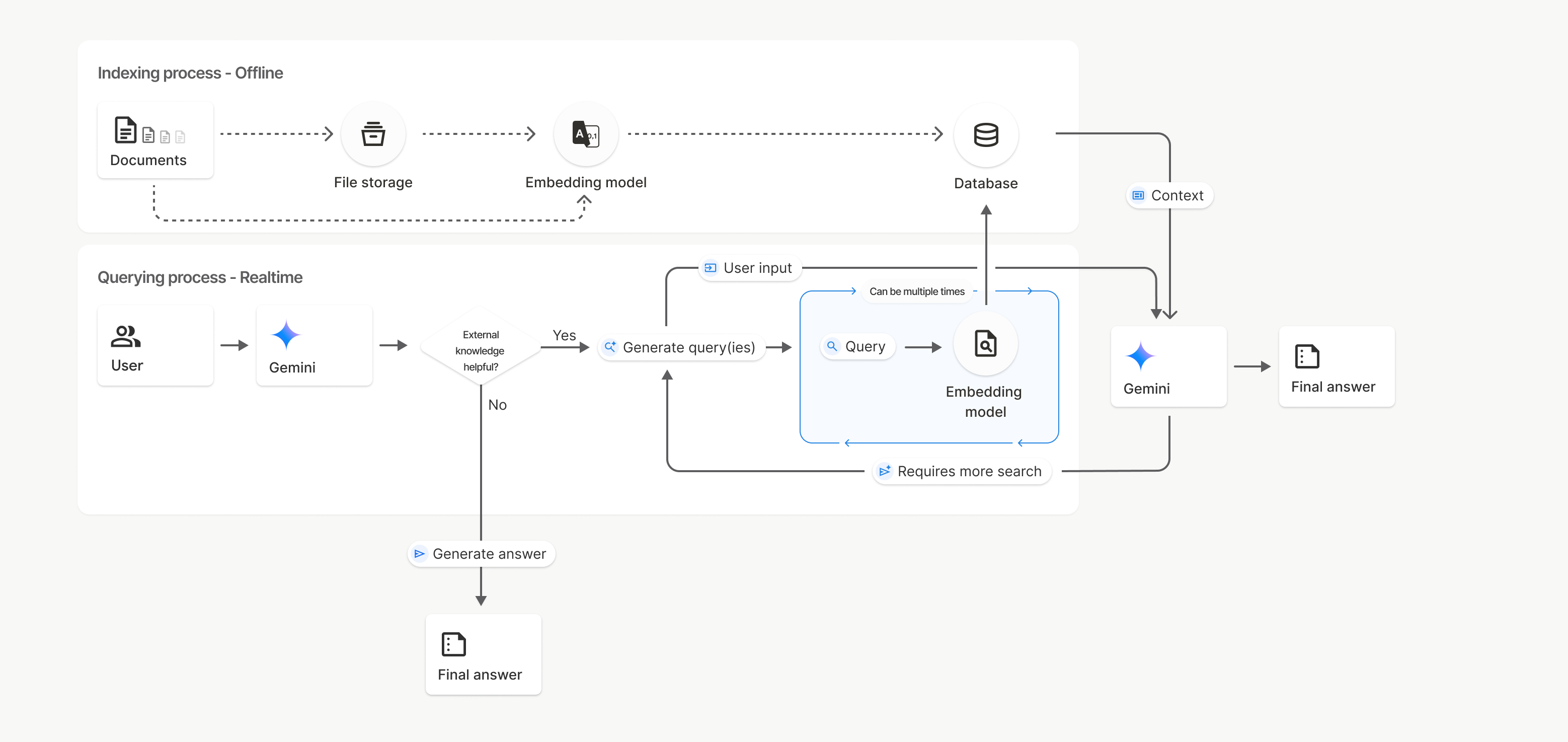
ในแผนภาพนี้ เส้นประจากเอกสารไปยังโมเดลการฝัง
(ใช้ gemini-embedding-001)
แสดงถึง uploadToFileSearchStore API (ข้ามที่เก็บไฟล์)
ไม่เช่นนั้น การใช้ Files API เพื่อสร้างแยกกัน
แล้วจึงนำเข้าไฟล์จะย้ายกระบวนการจัดทำดัชนีจาก Documents ไปยัง
ที่เก็บไฟล์ แล้วจึงไปยังโมเดลการฝัง
File Search stores
ที่เก็บการค้นหาไฟล์คือคอนเทนเนอร์สำหรับการฝังเอกสาร แม้ว่าระบบจะลบไฟล์ดิบที่อัปโหลดผ่าน File API หลังจาก 48 ชั่วโมง แต่ข้อมูลที่นำเข้าไปยังที่เก็บข้อมูลการค้นหาไฟล์จะจัดเก็บไว้เรื่อยๆ จนกว่าคุณจะลบด้วยตนเอง คุณสามารถ
สร้างที่เก็บการค้นหาไฟล์หลายรายการเพื่อจัดระเบียบเอกสารได้
FileSearchStore API ช่วยให้คุณสร้าง แสดงรายการ รับ และลบเพื่อจัดการร้านค้าค้นหาไฟล์ได้ ชื่อร้านค้าของ File Search จะมีขอบเขตทั่วโลก
ตัวอย่างวิธีจัดการร้านค้าที่ค้นหาไฟล์มีดังนี้
Python
file_search_store = client.file_search_stores.create(
    config={
        'display_name': 'myfilesearchstore123',
        'embedding_model': 'models/gemini-embedding-2'
    }
)

for store in client.file_search_stores.list():
    print(store)

my_file_search_store = client.file_search_stores.get(name=file_search_store.name)

client.file_search_stores.delete(name=file_search_store.name, config={'force': True})
JavaScript
const fileSearchStore = await ai.fileSearchStores.create({
  config: {
    displayName: 'myfilesearchstore123',
    embeddingModel: 'models/gemini-embedding-2'
  }
});

const fileSearchStores = await ai.fileSearchStores.list();
for await (const store of fileSearchStores) {
  console.log(store);
}

const myFileSearchStore = await ai.fileSearchStores.get({
  name: fileSearchStore.name
});

await ai.fileSearchStores.delete({
  name: fileSearchStore.name,
  config: { force: true }
});
REST
curl -X POST "https://generativelanguage.googleapis.com/v1beta/fileSearchStores?key=${GEMINI_API_KEY}" \
    -H "Content-Type: application/json" \
    -d '{ "displayName": "My Store", "embedding_model": "models/gemini-embedding-2" }'

curl "https://generativelanguage.googleapis.com/v1beta/fileSearchStores?key=${GEMINI_API_KEY}"

curl "https://generativelanguage.googleapis.com/v1beta/fileSearchStores/myfilesearchstore123?key=${GEMINI_API_KEY}"

curl -X DELETE "https://generativelanguage.googleapis.com/v1beta/fileSearchStores/myfilesearchstore123?key=${GEMINI_API_KEY}"
เอกสารการค้นหาไฟล์
คุณสามารถจัดการเอกสารแต่ละรายการในที่เก็บไฟล์ได้ด้วย API File Search Documents เพื่อlistเอกสารแต่ละรายการ
ในที่เก็บการค้นหาไฟล์ getข้อมูลเกี่ยวกับเอกสาร และdeleteเอกสาร
ตามชื่อ
Python
for document_in_store in client.file_search_stores.documents.list(parent='fileSearchStores/myfilesearchstore123'):
  print(document_in_store)

file_search_document = client.file_search_stores.documents.get(name='fileSearchStores/myfilesearchstore123/documents/sampletxt123')
print(file_search_document)

client.file_search_stores.documents.delete(name='fileSearchStores/myfilesearchstore123/documents/sampletxt123', config={'force': True})
JavaScript
const documents = await ai.fileSearchStores.documents.list({
  parent: 'fileSearchStores/myfilesearchstore123'
});
for await (const doc of documents) {
  console.log(doc);
}

const fileSearchDocument = await ai.fileSearchStores.documents.get({
  name: 'fileSearchStores/myfilesearchstore123/documents/sampletxt123'
});

await ai.fileSearchStores.documents.delete({
  name: 'fileSearchStores/myfilesearchstore123/documents/sampletxt123',
  config: { force: true }
});
REST
curl "https://generativelanguage.googleapis.com/v1beta/fileSearchStores/myfilesearchstore123/documents?key=${GEMINI_API_KEY}"

curl "https://generativelanguage.googleapis.com/v1beta/fileSearchStores/myfilesearchstore123/documents/sampletxt123?key=${GEMINI_API_KEY}"

curl -X DELETE "https://generativelanguage.googleapis.com/v1beta/fileSearchStores/myfilesearchstore123/documents/sampletxt123?key=${GEMINI_API_KEY}&force=true"
ข้อมูลเมตาของไฟล์
คุณสามารถเพิ่มข้อมูลเมตาที่กำหนดเองลงในไฟล์เพื่อช่วยกรองไฟล์หรือให้บริบทเพิ่มเติมได้ ข้อมูลเมตาคือชุดคู่คีย์-ค่า
Python
op = client.file_search_stores.import_file(
    file_search_store_name=file_search_store.name,
    file_name=sample_file.name,
    config={
        'custom_metadata': [
            {"key": "author", "string_value": "Robert Graves"},
            {"key": "year", "numeric_value": 1934}
        ]
    }
)
JavaScript
let operation = await ai.fileSearchStores.importFile({
  fileSearchStoreName: fileSearchStore.name,
  fileName: sampleFile.name,
  config: {
    customMetadata: [
      { key: "author", stringValue: "Robert Graves" },
      { key: "year", numericValue: 1934 }
    ]
  }
});
ซึ่งจะมีประโยชน์เมื่อคุณมีเอกสารหลายฉบับในที่เก็บการค้นหาไฟล์และต้องการ ค้นหาเฉพาะชุดย่อยของเอกสารเหล่านั้น
Python
interaction = client.interactions.create(
    model="gemini-3.5-flash",
    input="Tell me about the book 'I, Claudius'",
    tools=[{
        "type": "file_search",
        "file_search_store_names": [file_search_store.name],
        "metadata_filter": 'author="Robert Graves"',
    }]
)

for step in interaction.steps:
    if step.type == "model_output":
        for content_block in step.content:
            if content_block.type == "text":
                print(content_block.text)
JavaScript
const interaction = await ai.interactions.create({
  model: "gemini-3.5-flash",
  input: "Tell me about the book 'I, Claudius'",
  tools: [{
    type: "file_search",
    file_search_store_names: [fileSearchStore.name],
    metadata_filter: 'author="Robert Graves"',
  }]
});

for (const step of interaction.steps) {
  if (step.type === 'model_output') {
    for (const contentBlock of step.content) {
      if (contentBlock.type === 'text') {
        console.log(contentBlock.text);
      }
    }
  }
}
REST
curl "https://generativelanguage.googleapis.com/v1beta/interactions" \
    -H "x-goog-api-key: $GEMINI_API_KEY" \
    -H 'Content-Type: application/json' \
    -X POST \
    -d '{
            "model": "gemini-3.5-flash",
            "input": [{"type": "text", "text": "Tell me about the book I, Claudius"}],
            "tools": [{
                "type": "file_search",
                "file_search_store_names": ["'$STORE_NAME'"],
                "metadata_filter": "author = \"Robert Graves\""
            }]
        }' 2> /dev/null > response.json

cat response.json
ดูคำแนะนำในการใช้ไวยากรณ์ตัวกรองรายการสำหรับ metadata_filter ได้ที่ google.aip.dev/160
การค้นหาไฟล์หลายรูปแบบ
การค้นหาไฟล์แบบมัลติโมดัลช่วยให้คุณฝังและค้นหารูปภาพได้โดยตรง ซึ่งจะช่วยให้แอปพลิเคชัน RAG แบบมัลติโมดัลมีความสมบูรณ์ยิ่งขึ้น
กำหนดค่าโมเดลการฝัง
เมื่อสร้าง FileSearchStore คุณต้องลบล้างโมเดลการฝังข้อความเท่านั้นเริ่มต้นเพื่อใช้โมเดลแบบมัลติโมดัล ใช้ models/gemini-embedding-2 เพื่อ
ประมวลผลทั้งข้อความและรูปภาพ
Python
store = client.file_search_stores.create(
    config={
        "display_name": "Multimodal Catalog",
        "embedding_model": "models/gemini-embedding-2",
    }
)
JavaScript
const fileSearchStore = await ai.fileSearchStores.create({
  config: {
    displayName: "Multimodal Catalog",
    embeddingModel: "models/gemini-embedding-2",
  },
});
REST
curl -X POST "https://generativelanguage.googleapis.com/v1beta/fileSearchStores?key=$GEMINI_API_KEY" \
    -H "Content-Type: application/json" \
    -d '{
      "display_name": "Multimodal Catalog",
      "embedding_model": "models/gemini-embedding-2"
    }'
อัปโหลดรูปภาพ
หลังจากสร้างร้านค้าด้วยโมเดลการฝังแบบมัลติโมดัลแล้ว คุณจะอัปโหลดไฟล์รูปภาพได้โดยตรงโดยใช้ API การอัปโหลดเดียวกันที่อธิบายไว้ในอัปโหลดไปยังร้านค้าการค้นหาไฟล์โดยตรงหรือการนำเข้าไฟล์
ข้อกำหนดเกี่ยวกับไฟล์รูปภาพ:
- ไฟล์รูปภาพต้องมีความละเอียดไม่เกิน 4K x 4K พิกเซล
- รูปแบบที่รองรับ ได้แก่ PNG, JPEG
การอ้างอิง
เมื่อคุณใช้การค้นหาไฟล์ คำตอบของโมเดลอาจมีการอ้างอิงที่ระบุส่วนของเอกสารที่คุณอัปโหลดซึ่งใช้ในการสร้างคำตอบ ซึ่งจะช่วยในการตรวจสอบข้อเท็จจริงและการยืนยัน
คุณเข้าถึงข้อมูลการอ้างอิงได้ผ่านแอตทริบิวต์ annotations ภายในบล็อก content ของคำตอบในขั้นตอน model_output
Python
for step in interaction.steps:
    if step.type == 'model_output':
        for content in step.content:
            if content.type == 'text' and content.annotations:
                print(content.annotations)
JavaScript
for (const step of interaction.steps) {
  if (step.type === 'model_output') {
    for (const contentBlock of step.content) {
      if (contentBlock.type === 'text' && contentBlock.annotations) {
        console.log(JSON.stringify(contentBlock.annotations, null, 2));
      }
    }
  }
}
REST
{
  "steps": [
    {
      "type": "model_output",
      "content": [
        {
          "type": "text",
          "text": "...",
          "annotations": [
            {
              "type": "file_citation",
              "file_name": "sample.txt",
              "source": "..."
            }
          ]
        }
      ]
    }
  ]
}
ดูข้อมูลโดยละเอียดเกี่ยวกับโครงสร้างของการอ้างอิงได้ที่ การอ้างอิง API สำหรับการโต้ตอบ
หมายเลขหน้า
เมื่อใช้การค้นหาไฟล์กับเอกสารที่มีหน้า (เช่น PDF) คำตอบของโมเดลอาจมีหมายเลขหน้าที่มีข้อมูล
คุณเข้าถึงข้อมูลนี้ได้ผ่านแอตทริบิวต์ page_number ของคำอธิบายประกอบ
file_citation
Python
for step in interaction.steps:
    if step.type == "model_output":
        for content in step.content:
            if content.type == "text" and content.annotations:
                for annotation in content.annotations:
                    if annotation.type == "file_citation" and annotation.page_number:
                        print(f"Cited Page: {annotation.page_number}")
JavaScript
for (const step of interaction.steps) {
  if (step.type === 'model_output') {
    for (const block of step.content) {
      if (block.type === 'text' && block.annotations) {
        for (const annotation of block.annotations) {
          if (annotation.type === 'file_citation' && annotation.pageNumber) {
            console.log(`Cited Page: ${annotation.pageNumber}`);
          }
        }
      }
    }
  }
}
REST
{
  "steps": [
    {
      "type": "model_output",
      "content": [
        {
          "type": "text",
          "text": "...",
          "annotations": [
            {
              "type": "file_citation",
              "file_name": "document.pdf",
              "page_number": 1,
              "source": "..."
            }
          ]
        }
      ]
    }
  ]
}
การอ้างอิงสื่อ
เมื่อโมเดลอ้างอิงก้อนรูปภาพในระหว่างการสร้าง API จะแสดงคำอธิบายประกอบประเภท file_citation ในคำอธิบายประกอบซึ่งมี media_id คุณใช้
รหัสนี้เพื่อดาวน์โหลดก้อนรูปภาพที่ตรงกันทุกประการซึ่งโมเดลอ้างอิงได้ media_idนี้
จะคงอยู่ในการเรียกค้นหาหลายครั้ง ซึ่งช่วยให้คุณเรียก
รูปภาพเดียวกันหรือแคชรูปภาพได้อย่างน่าเชื่อถือโดยใช้รหัส
ข้อมูลโค้ดต่อไปนี้เป็นตัวอย่างขั้นตอนการตอบกลับ REST
{
  "type": "model_output",
  "content": [
    {
      "type": "text",
      "text": "...",
      "annotations": [
        {
          "type": "file_citation",
          "file_name": "product_image",
          "media_id": "fileSearchStores/my-store-123/media/BlobId-456"
        }
      ]
    }
  ]
}
ข้อมูลโค้ดต่อไปนี้แสดงวิธีดึงข้อมูล media_id และดาวน์โหลดสื่อ
Python
for step in interaction.steps:
    if step.type == "model_output":
        for content in step.content:
            if content.type == "text" and content.annotations:
                for annotation in content.annotations:
                    if annotation.type == "file_citation" and annotation.media_id:
                        print(f"Cited Media ID: {annotation.media_id}")
                        blob_content = client.file_search_stores.download_media(
                            media_id=annotation.media_id
                        )
JavaScript
for (const step of interaction.steps) {
  if (step.type === 'model_output') {
    for (const block of step.content) {
      if (block.type === 'text' && block.annotations) {
        for (const annotation of block.annotations) {
          if (annotation.type === 'file_citation' && annotation.mediaId) {
            console.log(`Cited Media ID: ${annotation.mediaId}`);
            const blobContent = await ai.fileSearchStores.downloadMedia(annotation.mediaId);
          }
        }
      }
    }
  }
}
REST
curl -X GET "https://generativelanguage.googleapis.com/v1/fileSearchStores/my-store-123/media/BlobId-456" \
  -H "x-goog-api-key: $GEMINI_API_KEY"
ข้อมูลเมตาที่กำหนดเอง
หากเพิ่มข้อมูลเมตาที่กำหนดเองลงในไฟล์ คุณจะเข้าถึงข้อมูลเมตาดังกล่าวได้ใน
คำอธิบายประกอบของคำตอบของโมเดล ซึ่งมีประโยชน์ในการส่งบริบทเพิ่มเติม (เช่น URL, หมายเลขหน้า หรือผู้เขียน) จากเอกสารต้นฉบับไปยังตรรกะของแอปพลิเคชัน คำอธิบายประกอบการอ้างอิงแต่ละรายการของประเภท file_citation
มีข้อมูลเมตาที่กำหนดเองนี้
Python
interaction = client.interactions.create(
    model="gemini-3.5-flash",
    input="Tell me about [insert question]",
    tools=[{
        "type": "file_search",
        "file_search_store_names": [file_search_store.name]
    }]
)

for step in interaction.steps:
    if step.type == "model_output":
        for content_block in step.content:
            if content_block.annotations:
                for annotation in content_block.annotations:
                    print(annotation)
JavaScript
const interaction = await ai.interactions.create({
  model: "gemini-3.5-flash",
  input: "Tell me about [insert question]",
  tools: [{
    type: "file_search",
    file_search_store_names: [fileSearchStore.name]
  }]
});

for (const step of interaction.steps) {
  if (step.type === 'model_output') {
    for (const contentBlock of step.content) {
      if (contentBlock.annotations) {
        contentBlock.annotations.forEach((annotation) => {
          console.log(annotation);
        });
      }
    }
  }
}
REST
{
  "steps": [
    {
      "type": "model_output",
      "content": [
        {
          "type": "text",
          "text": "...",
          "annotations": [
            {
              "file_name": "...",
              "source": "...",
              "custom_metadata": [
                {
                  "key": "author",
                  "string_value": "Robert Graves"
                },
                {
                  "key": "year",
                  "numeric_value": 1934
                }
              ]
            }
          ]
        }
      ]
    }
  ]
}
เอาต์พุตที่มีโครงสร้าง
ตั้งแต่โมเดล Gemini 3 เป็นต้นไป คุณจะใช้เครื่องมือค้นหาไฟล์ร่วมกับเอาต์พุตที่มีโครงสร้างได้
Python
from pydantic import BaseModel, Field

class Money(BaseModel):
    amount: str = Field(description="The numerical part of the amount.")
    currency: str = Field(description="The currency of amount.")

interaction = client.interactions.create(
    model="gemini-3.5-flash",
    input="What is the minimum hourly wage in Tokyo right now?",
    tools=[{
        "type": "file_search",
        "file_search_store_names": [file_search_store.name]
    }],
    response_format={
        "type": "text",
        "mime_type": "application/json",
        "schema": Money.model_json_schema()
    },
)
result = Money.model_validate_json(interaction.output_text)
print(result)
JavaScript
import { z } from "zod";

const moneyJsonSchema = {
  type: "object",
  properties: {
    amount: { type: "string", description: "The numerical part of the amount." },
    currency: { type: "string", description: "The currency of amount." }
  },
  required: ["amount", "currency"]
};

const moneySchema = z.fromJSONSchema(moneyJsonSchema);

async function run() {
  const interaction = await ai.interactions.create({
    model: "gemini-3.5-flash",
    input: "What is the minimum hourly wage in Tokyo right now?",
    tools: [{
      type: "file_search",
      file_search_store_names: [fileSearchStore.name],
    }],
    response_format: {
      type: 'text',
      mime_type: 'application/json',
      schema: moneyJsonSchema
    },
  });

  const result = moneySchema.parse(JSON.parse(interaction.output_text));
  console.log(result);
}

run();
REST
curl "https://generativelanguage.googleapis.com/v1beta/interactions" \
  -H "x-goog-api-key: $GEMINI_API_KEY" \
  -H 'Content-Type: application/json' \
  -X POST \
  -d '{
    "model": "gemini-3.5-flash",
    "input": "What is the minimum hourly wage in Tokyo right now?",
    "tools": [{
      "type": "file_search",
      "file_search_store_names": ["$FILE_SEARCH_STORE_NAME"]
    }],
    "response_format": {
      "type": "text",
      "mime_type": "application/json",
      "schema": {
        "type": "object",
        "properties": {
          "amount": {"type": "string", "description": "The numerical part of the amount."},
          "currency": {"type": "string", "description": "The currency of amount."}
        },
        "required": ["amount", "currency"]
      }
    }
  }'
รุ่นที่รองรับ
รุ่นต่อไปนี้รองรับการค้นหาไฟล์
| รุ่น | ค้นหาไฟล์ |
|---|---|
| Gemini 3.5 Flash | ✔️ |
| ตัวอย่าง Gemini 3.1 Pro | ✔️ |
| Gemini 3.1 Flash-Lite | ✔️ |
| ตัวอย่าง Gemini 3 Flash | ✔️ |
ประเภทไฟล์ที่สนับสนุน
การค้นหาไฟล์รองรับรูปแบบไฟล์หลากหลายรูปแบบตามที่ระบุไว้ในส่วนต่อไปนี้
ประเภทไฟล์แอปพลิเคชัน
application/dartapplication/ecmascriptapplication/jsonapplication/ms-javaapplication/mswordapplication/pdfapplication/sqlapplication/typescriptapplication/vnd.curlapplication/vnd.dartapplication/vnd.ibm.secure-containerapplication/vnd.jupyterapplication/vnd.ms-excelapplication/vnd.oasis.opendocument.textapplication/vnd.openxmlformats-officedocument.presentationml.presentationapplication/vnd.openxmlformats-officedocument.spreadsheetml.sheetapplication/vnd.openxmlformats-officedocument.wordprocessingml.documentapplication/vnd.openxmlformats-officedocument.wordprocessingml.templateapplication/x-cshapplication/x-hwpapplication/x-hwp-v5application/x-latexapplication/x-phpapplication/x-powershellapplication/x-shapplication/x-shellscriptapplication/x-texapplication/x-zshapplication/xmlapplication/zip
ประเภทไฟล์ข้อความ
text/1d-interleaved-parityfectext/REDtext/SGMLtext/cache-manifesttext/calendartext/cqltext/cql-extensiontext/cql-identifiertext/csstext/csvtext/csv-schematext/dnstext/encaprtptext/enrichedtext/exampletext/fhirpathtext/flexfectext/fwdredtext/gff3text/grammar-ref-listtext/hl7v2text/htmltext/javascripttext/jcr-cndtext/jsxtext/markdowntext/mizartext/n3text/parameterstext/parityfectext/phptext/plaintext/provenance-notationtext/prs.fallenstein.rsttext/prs.lines.tagtext/prs.prop.logictext/raptorfectext/rfc822-headerstext/rtftext/rtp-enc-aescm128text/rtploopbacktext/rtxtext/sgmltext/shaclctext/shextext/spdxtext/stringstext/t140text/tab-separated-valuestext/texmacstext/trofftext/tsvtext/tsxtext/turtletext/ulpfectext/uri-listtext/vcardtext/vnd.DMClientScripttext/vnd.IPTC.NITFtext/vnd.IPTC.NewsMLtext/vnd.atext/vnd.abctext/vnd.ascii-arttext/vnd.curltext/vnd.debian.copyrighttext/vnd.dvb.subtitletext/vnd.esmertec.theme-descriptortext/vnd.exchangeabletext/vnd.familysearch.gedcomtext/vnd.ficlab.flttext/vnd.flytext/vnd.fmi.flexstortext/vnd.gmltext/vnd.graphviztext/vnd.hanstext/vnd.hgltext/vnd.in3d.3dmltext/vnd.in3d.spottext/vnd.latex-ztext/vnd.motorola.reflextext/vnd.ms-mediapackagetext/vnd.net2phone.commcenter.commandtext/vnd.radisys.msml-basic-layouttext/vnd.senx.warpscripttext/vnd.sositext/vnd.sun.j2me.app-descriptortext/vnd.trolltech.linguisttext/vnd.wap.sitext/vnd.wap.sltext/vnd.wap.wmltext/vnd.wap.wmlscripttext/vtttext/wgsltext/x-asmtext/x-bibtextext/x-bootext/x-ctext/x-c++hdrtext/x-c++srctext/x-cassandratext/x-chdrtext/x-coffeescripttext/x-componenttext/x-cshtext/x-csharptext/x-csrctext/x-cudatext/x-dtext/x-difftext/x-dsrctext/x-emacs-lisptext/x-erlangtext/x-gff3text/x-gotext/x-haskelltext/x-javatext/x-java-propertiestext/x-java-sourcetext/x-kotlintext/x-lilypondtext/x-lisptext/x-literate-haskelltext/x-luatext/x-moctext/x-objcsrctext/x-pascaltext/x-pcs-gcdtext/x-perltext/x-perl-scripttext/x-pythontext/x-python-scripttext/x-r-markdowntext/x-rsrctext/x-rsttext/x-ruby-scripttext/x-rusttext/x-sasstext/x-scalatext/x-schemetext/x-script.pythontext/x-scsstext/x-setexttext/x-sfvtext/x-shtext/x-siestatext/x-sostext/x-sqltext/x-swifttext/x-tcltext/x-textext/x-vbasictext/x-vcalendartext/xmltext/xml-dtdtext/xml-external-parsed-entitytext/yaml
ข้อจำกัด
- Live API: ไม่รองรับการค้นหาไฟล์ใน Live API
- เครื่องมือไม่รองรับ: เครื่องมือการอ้างอิงในตัวจะใช้ร่วมกันไม่ได้ เช่น การค้นหาไฟล์จะใช้พร้อมกับการอ้างอิงด้วย Google Search หรือ บริบท URL ในคำขอเดียวกันไม่ได้
ขีดจำกัดอัตรา
File Search API มีขีดจำกัดต่อไปนี้เพื่อบังคับใช้ความเสถียรของบริการ
- ขนาดไฟล์สูงสุด / ขีดจำกัดต่อเอกสาร: 100 MB
- ขนาดรวมของที่เก็บข้อมูลการค้นหาไฟล์ของโปรเจ็กต์ (อิงตามระดับผู้ใช้)
- ฟรี: 1 GB
- ระดับ 1: 10 GB
- ระดับ 2: 100 GB
- ระดับ 3: 1 TB
- คำแนะนำ: จำกัดขนาดของที่เก็บข้อมูลการค้นหาไฟล์แต่ละรายการให้ต่ำกว่า 20 GB เพื่อให้มั่นใจว่าเวลาในการดึงข้อมูลจะเหมาะสมที่สุด
ราคา
- ระบบจะเรียกเก็บเงินค่า Embedding จากคุณในเวลาที่จัดทำดัชนีตามราคา Embedding ที่มีอยู่
- ไม่มีค่าใช้จ่ายในการจัดเก็บ
- การฝังเวลาการค้นหาไม่มีค่าใช้จ่าย
- ระบบจะเรียกเก็บเงินสำหรับโทเค็นเอกสารที่ดึงมาเป็นโทเค็นบริบทปกติ
ขั้นตอนถัดไป
- ไปที่ข้อมูลอ้างอิง API สำหรับร้านค้าค้นหาไฟล์และเอกสารการค้นหาไฟล์