
LiteRT supports Intel OpenVino through the CompiledModel API
for both AOT and on-device compilation.
Python API
Set up development environment
Linux (x86_64):
- Ubuntu 22.04 or 24.04 LTS
- Python 3.10+ — install from python.org
or your distro (
sudo apt install python3 python3-venv) - Intel NPU driver v1.32.1 — see Linux NPU Setup
Windows (x86_64):
- Windows 10 or 11
- Python 3.10+ — install from python.org
- Intel NPU driver 32.0.100.4724+ — see Windows NPU Setup
For building from source, Bazel 7.4.1+ using Bazelisk or the hermetic Docker build is also required.
Supported SoCs
| Platform | NPU | Codename | OS |
|---|---|---|---|
| Intel Core Ultra Series 2 | NPU4000 | Lunar Lake (LNL) | Linux, Windows |
| Intel Core Ultra Series 3 | NPU5010 | Panther Lake (PTL) | Linux, Windows |
Quick Start
1. Install NPU Drivers
See Linux NPU Setup or Windows NPU Setup. Skip if you only need AOT.
The NPU driver is only needed on systems that execute the model on NPU hardware. Pure AOT-build systems can skip it.
Note:
ai-edge-litert-sdk-intel-nightlypins the matching OpenVINO nightly wheel by PEP 440 version (e.g.openvino==2026.2.0.dev20260506), so pip needs--extra-index-url https://storage.openvinotoolkit.org/simple/wheels/nightlyto locate it. On Linux, if distro auto-detection picks the wrong archive, setLITERT_OV_OS_ID=ubuntu22orubuntu24beforepip install.
2. Create a Python Virtual Environment
Recommended to keep the nightly openvino wheel isolated from any system-wide
OpenVINO install.
python -m venv litert_env
# Linux / macOS
source litert_env/bin/activate
# Windows (PowerShell)
.\litert_env\Scripts\Activate.ps1
python -m pip install --upgrade pip
3. Install the pip Package
pip install --pre \
--extra-index-url https://storage.openvinotoolkit.org/simple/wheels/nightly \
ai-edge-litert-nightly ai-edge-litert-sdk-intel-nightly
The --extra-index-url lets pip resolve the pinned openvino nightly wheel
from OpenVINO's index alongside packages on PyPI.
4. Verify Installation
python -c "
from ai_edge_litert.aot.vendors.intel_openvino import intel_openvino_backend
import ai_edge_litert_sdk_intel, openvino, os
print('Backend:', intel_openvino_backend.IntelOpenVinoBackend.id())
print('Dispatch:', intel_openvino_backend.get_dispatch_dir())
print('OpenVINO:', openvino.__version__)
print('SDK libs:', sorted(os.listdir(ai_edge_litert_sdk_intel.path_to_sdk_libs())))
print('Available devices:', openvino.Core().available_devices)
"
What to check in the output:
SDK libslistslibopenvino_intel_npu_compiler.so(Linux) oropenvino_intel_npu_compiler.dll(Windows) — required for AOT.Available devicesincludesNPU— confirms the NPU driver is installed and OpenVINO can talk to the device.NPUwill be absent on AOT-only systems (where the driver is not installed) and on systems without Intel NPU hardware.
5. AOT Compile (Optional)
- Pre-compiles a
.tflitefor a specific Intel NPU target (PTL or LNL) so the runtime skips the compiler plugin step. - Does not need a physical NPU or the NPU driver — only
ai-edge-litert-nightlyandai-edge-litert-sdk-intel-nightly. - Cross-compilation is supported: compile on any Linux or Windows host, ship
the resulting
.tfliteto a target of either OS and run it there.
Output files are named <model>_IntelOpenVINO_<SoC>_apply_plugin.tflite.
from ai_edge_litert.aot import aot_compile
from ai_edge_litert.aot.vendors.intel_openvino import target as intel_target

# Compile for a single Intel NPU target (PTL or LNL).
aot_compile.aot_compile(
    "model.tflite",
    output_dir="out",
    target=intel_target.Target(soc_model=intel_target.SocModel.PTL),
)

# Or omit target= to compile for every registered backend/target.
aot_compile.aot_compile("model.tflite", output_dir="out", keep_going=True)
6. Run NPU Inference
LiteRT supports two inference paths on Intel NPU:
- JIT — load a raw
.tflite; the compiler plugin partitions and compiles supported ops for the NPU atCompiledModel.from_file()time. Adds some first-run latency (varies by model). - AOT-compiled — load a
<model>_IntelOpenVINO_<SoC>_apply_plugin.tfliteproduced by step 4. Skips the partition and compilation step at load time.
This snippet works for both:
from ai_edge_litert.compiled_model import CompiledModel
from ai_edge_litert.hardware_accelerator import HardwareAccelerator

model = CompiledModel.from_file(
    "model.tflite",  # raw tflite (JIT) or ..._apply_plugin.tflite (AOT)
    hardware_accel=HardwareAccelerator.NPU | HardwareAccelerator.CPU,
)

sig_key = list(model.get_signature_list().keys())[0]
sig_idx = model.get_signature_index(sig_key)
input_buffers = model.create_input_buffers(sig_idx)
output_buffers = model.create_output_buffers(sig_idx)
model.run_by_index(sig_idx, input_buffers, output_buffers)
print("Fully accelerated:", model.is_fully_accelerated())
Confirm JIT actually ran
When JIT succeeds, the log contains (file extension is .so on Linux, .dll on
Windows):
INFO: [compiler_plugin.cc:236] Loaded plugin at: .../LiteRtCompilerPlugin_IntelOpenvino.{so,dll}
INFO: [compiler_plugin.cc:690] Partitioned subgraph<0>, selected N ops, from a total of N ops
INFO: [compiled_model.cc:1006] JIT compilation changed model, reserializing...
If those lines are absent but Fully accelerated: True is still reported, the
model was run on XNNPACK CPU fallback, not on the NPU — see the JIT
troubleshooting row.
7. Benchmark
# Dispatch library and the NPU compiler are auto-discovered from the wheel.
litert-benchmark --model=model.tflite --use_npu --num_runs=50
Common flags:
| Flag | Default | Description |
|---|---|---|
--model PATH
|
— | Path to the .tflite model
(required). |
--signature KEY |
first | Signature key to run. |
--use_cpu / --no_cpu
|
on | Toggle the CPU accelerator / CPU fallback. |
--use_gpu |
off | Enable the GPU accelerator. |
--use_npu |
off | Enable the Intel NPU accelerator. |
--require_full_delegation
|
off | Fail if the model is not fully offloaded to the selected accelerator. |
--num_runs N
|
50 | Number of timed inference iterations. |
--warmup_runs N
|
5 | Untimed warm-up iterations before measurement. |
--num_threads N |
1 | CPU thread count. |
--result_json PATH
|
— | Write a JSON summary (latency stats, throughput, accelerator list). |
--verbose |
off | Extra runtime logging. |
Advanced / override flags — only needed to point at custom builds:
--dispatch_library_path, --compiler_plugin_path, --runtime_path.
Mixed-vendor wheels: pinning JIT to Intel OV
Note: When
Environment.create()is called without explicit paths, it auto-discovers vendors underai_edge_litert/vendors/in alphabetical order and registers the first one it finds. In a mixed-vendor install this may not be Intel OV — pass the Intel OV directories explicitly to force the right pick.
- The pip wheel ships compiler plugins for every registered vendor
(
intel_openvino/,google_tensor/,mediatek/,qualcomm/,samsung/). - To force the Intel OV path (recommended when multiple vendor SDKs are installed), pass the Intel OV directories by hand:
from ai_edge_litert.environment import Environment
from ai_edge_litert.compiled_model import CompiledModel
from ai_edge_litert.hardware_accelerator import HardwareAccelerator
from ai_edge_litert.aot.vendors.intel_openvino import intel_openvino_backend as ov

env = Environment.create(
    compiler_plugin_path=ov.get_compiler_plugin_dir(),   # JIT compiler
    dispatch_library_path=ov.get_dispatch_dir(),          # runtime
)
model = CompiledModel.from_file(
    "model.tflite",
    hardware_accel=HardwareAccelerator.NPU | HardwareAccelerator.CPU,
    environment=env,
)
The runtime loads every shared library it finds in the given directory, so
pointing at vendors/intel_openvino/compiler/ loads only the Intel plugin; the
Google Tensor / MediaTek / Qualcomm / Samsung plugins in sibling directories are
never touched.
For the CLI, the equivalent flags are:
DISPATCH_DIR=$(python3 -c 'from ai_edge_litert.aot.vendors.intel_openvino import intel_openvino_backend as ov; print(ov.get_dispatch_dir())')
COMPILER_DIR=$(python3 -c 'from ai_edge_litert.aot.vendors.intel_openvino import intel_openvino_backend as ov; print(ov.get_compiler_plugin_dir())')

litert-benchmark --model=model.tflite --use_npu \
    --compiler_plugin_path=$COMPILER_DIR \
    --dispatch_library_path=$DISPATCH_DIR
Verify NPU Execution
To confirm the model actually ran on the NPU, check for both signals:
- The log contains
Loading shared library:
.../LiteRtDispatch_IntelOpenvino.{so,dll}
— the Intel dispatch library was loaded (.soon Linux,.dllon Windows). model.is_fully_accelerated()returnsTrue— every op was offloaded to the selected accelerator.
is_fully_accelerated() alone is not sufficient: if the dispatch library
never loaded, ops were fully offloaded to XNNPACK/CPU, not the NPU.
Linux NPU Setup
Note: Skip this section if you only need AOT — a physical NPU isn't required.
Info: Use NPU driver v1.32.1 (paired with OpenVINO 2026.1). Older drivers fail with
Level0 pfnCreate2
result: ZE_RESULT_ERROR_UNSUPPORTED_FEATURE
.
# 1. NPU driver (Ubuntu 24.04 use -ubuntu2204 tarball for 22.04).
sudo dpkg --purge --force-remove-reinstreq \
  intel-driver-compiler-npu intel-fw-npu intel-level-zero-npu intel-level-zero-npu-dbgsym || true
wget https://github.com/intel/linux-npu-driver/releases/download/v1.32.1/linux-npu-driver-v1.32.1.20260422-24767473183-ubuntu2404.tar.gz
tar -xf linux-npu-driver-v1.32.1.*.tar.gz
sudo apt update && sudo apt install -y libtbb12
sudo dpkg -i intel-fw-npu_*.deb intel-level-zero-npu_*.deb intel-driver-compiler-npu_*.deb

# 2. Level Zero loader v1.27.0.
wget https://snapshot.ppa.launchpadcontent.net/kobuk-team/intel-graphics/ubuntu/20260324T100000Z/pool/main/l/level-zero-loader/libze1_1.27.0-1~24.04~ppa2_amd64.deb
sudo dpkg -i libze1_*.deb

# 3. Permissions + verify.
sudo gpasswd -a ${USER} render && newgrp render
ls /dev/accel/accel0   # must exist after reboot
Then run the install + verify snippet from Quick Start.
Windows NPU Setup
Note: Skip this section if you only need AOT — a physical NPU isn't required.
- Install the Intel NPU driver (32.0.100.4724+) from the Intel Download Center.
- Verify Device Manager lists the NPU device under Neural processors
(shown as
Intel(R) AI BoostorIntel(R) NPUdepending on the driver). - Run the install + verify snippet from Quick Start, replacing
pipwithpython -m pip.
Info:
import ai_edge_litertauto-registers DLL directories usingos.add_dll_directory(), so Python scripts need noPATHsetup. For non-Python consumers, runsetupvars.bator prepend<openvino>/libstoPATH.
Build from Source
Behind a proxy? Export
http_proxy/https_proxy/no_proxybefore running the build scripts — they forward these into Docker and the container.
Linux (Docker, hermetic):
cd LiteRT/docker_build && ./build_wheel_with_docker.sh
Windows (PowerShell, Bazel in PATH):
.\ci\build_pip_package_with_bazel_windows.ps1
Outputs land in dist/:
ai_edge_litert-*.whl— the runtime wheel.ai_edge_litert_sdk_{intel,qualcomm,mediatek,samsung}-*.tar.gz— vendor sdists.- The Intel sdist is ~5 KB; the NPU compiler
.so/.dllis fetched atpip installtime, so the same sdist works on Linux and Windows.
Unit Tests
bazel test \
  //litert/python/aot/vendors/intel_openvino:intel_openvino_backend_test \
  //litert/c/options:litert_intel_openvino_options_test \
  //litert/cc/options:litert_intel_openvino_options_test \
  //litert/tools/flags/vendors:intel_openvino_flags_test
Troubleshooting
| Issue | Fix |
|---|---|
AOT fails: Device with "NPU" name is not registered |
NPU compiler not fetched. Check ai_edge_litert_sdk_intel.path_to_sdk_libs() lists libopenvino_intel_npu_compiler.so / .dll. If empty, reinstall with network access, or set LITERT_OV_OS_ID=ubuntu22/ubuntu24. |
JIT runs on CPU instead of NPU (no Partitioned subgraph log, no Loaded plugin log, Fully accelerated: True still printed) |
Compiler plugin was not discovered. Confirm ov.get_compiler_plugin_dir() returns a path under ai_edge_litert/vendors/intel_openvino/compiler/. If multiple vendor SDKs are installed, pass compiler_plugin_path=ov.get_compiler_plugin_dir() explicitly to Environment.create() (or --compiler_plugin_path=... to litert-benchmark). |
JIT fails: Cannot load library .../openvino/libs/libopenvino_intel_npu_compiler.so (Linux) / openvino_intel_npu_compiler.dll (Windows) |
The SDK sdist copies the NPU compiler to openvino/libs/ on first import ai_edge_litert_sdk_intel. If the copy was skipped (readonly FS, missing openvino), reinstall ai-edge-litert-sdk-intel after openvino is installed, then import ai_edge_litert in a fresh process. |
Level0 pfnCreate2 result: ZE_RESULT_ERROR_UNSUPPORTED_FEATURE |
Upgrade NPU driver to v1.32.1 (Linux). |
/dev/accel/accel0 not found |
sudo dmesg | grep -i vpu to debug the driver; reboot after install. |
| Permission denied on NPU | sudo gpasswd -a ${USER} render && newgrp render. |
| Windows: NPU not in Device Manager | Install NPU driver 32.0.100.4724+ from Intel Download Center. |
Windows: Failed to initialize Dispatch API / missing DLLs |
Ensure import ai_edge_litert runs first (auto-registers DLL dirs); for non-Python callers, run setupvars.bat or prepend <openvino>/libs to PATH. |
Windows build: LNK2001 fixed_address_empty_string, C2491 dllimport, Python 3.12+ fails |
Protobuf ABI / Python version constraint — see ci/build_pip_package_with_bazel_windows.ps1; Windows builds require Python 3.11. |
Limitations
Only the NPU device is supported through the OpenVINO dispatch path. For CPU
inference, use HardwareAccelerator.CPU alone (XNNPACK).
C++ API
Prerequisites and build setup
Build prerequisites:
- Visual Studio 2022 or higher (C++ development tools must be installed).
- git: Install git from https://git-scm.com/install/. Ensure that
C:\Program Files\Git\bin and C:\Program Files\Git\cmdare included in your system's PATH environment variable to allow bash.exe and git.exe to be located by the LiteRT/LiteRT-LM build processes. - bazelisk: Install bazelisk and include its location in your system's
PATHenvironment variable: https://bazel.build/install/bazelisk. - Cmake: Install Cmake version 4.3.0 or higher from https://cmake.org/download/, verifying that Cmake is included in your system's PATH.
- Python: Make sure python 3.11 or higher is installed, and python.exe is in your PATH.
- Windows Settings: Enable Developer Mode within Windows Settings.
Build LiteRT tools and plugins for Intel NPU
To run models on the Intel NPU with LiteRT, they are required to be compiled using the LiteRT Intel OpenVINO compiler plugin; Furthermore, any compiled model intended for execution on the Intel NPU must be delegated to the LiteRT Intel OpenVINO dispatch plugin.
The mechanism by which LiteRT invokes these plugins is illustrated subsequently:
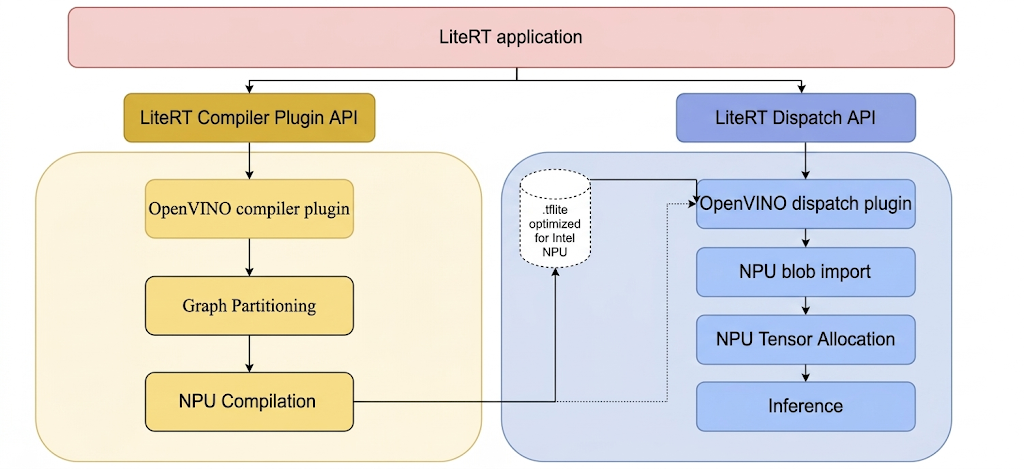
Steps to build LiteRT tools and Intel plugins.
Before you build any executable or library from LiteRT, create a local directory, for example, C:\bzl. The build output binary will be collected from this directory. Build the Intel OpenVINO dispatch plugin
# At the top-level directory of LiteRT repository
bazelisk --output_base=C:\bzl build //litert/vendors/intel_openvino/dispatch:LiteRtDispatch --config=windows
Alternatively, you can also build the dispatch plugin from the LiteRT-LM
repository, by adding an @litert prefix on the target. This is similar for all
following targets from the LiteRT repository.
# At the top-level directory of LiteRT-LM repository
bazelisk --output_base=C:\bzl build @litert//litert/vendors/intel_openvino/dispatch:LiteRtDispatch --config=windows
Build the Intel OpenVINO compiler plugin
bazelisk --output_base=C:\bzl build //litert/vendors/intel_openvino/compiler:LiteRtCompilerPlugin --config=windows
Build LiteRT Ahead-of-Time (AOT) compiler utility Some LiteRT tools require explicit AOT compilation of models before running them on Intel NPU. Build instruction of the LiteRT AOT compiler utility:
bazelisk --output_base=C:\bzl build
//litert/tools:apply_plugin_main --config=windows
Build LiteRT model runner The LiteRT model runner can be used to run a model on Intel NPU, either non-precompiled model or AOT-compiled model. The instruction to build the model runner:
bazelisk --output_base=C:\bzl build //litert/tools:run_model --config=windows
Build LiteRT benchmark model utility The LiteRT model benchmark tool can be used to benchmark the performance of inference of a model on Intel NPU. If instruction to build the benchmark tool:
bazelisk --output_base=C:\bzl build //litert/tools:benchmark_model --config=windows --define=protobuf_allow_msvc=true
Build LiteRT numerics check utility
bazelisk --output_base=C:\bzl build //litert/tools:npu_numerics_check --config=windows
Advanced usage: build with customized Intel OpenVINO SDK
The LiteRT build system fetches the prebuilt Intel OpenVINO SDK automatically when compiling the compiler and dispatch plugins.
If your project requires a specific or customized version of the Intel OpenVINO SDK, complete these additional configuration steps prior to starting the plugin build:
- Download the latest OpenVINO release binary for Windows from
https://www.intel.com/content/www/us/en/download/753640/intel-distribution-of-openvino-toolkit.html,
and extract it to local disk, for example,
C:\Intel\intel_openvino. - Ensure the only child directory under this path is named "openvino", containing sub-directories like "runtime" and "include".
- Go to the root directory of the cloned LiteRT repository in your console
(command prompt or PowerShell), and set the OPENVINO_NATIVE_DIR variable
(make sure there is no trailing
\`), for example:set OPENVINO_NATIVE_DIR=C:\Intel\intel_openvino`
AOT compilation of custom models
This section prepares the environment and performs AOT compilation of custom TFLite, PyTorch or JAX models for LiteRT.
During the model compilation process for the Intel NPU, LiteRT validates the model graph against the operators supported by the LiteRT Intel OpenVINO compiler plugin. For operators or subgraphs that are compatible with the compiler plugin, LiteRT compiles each such subgraph into a DISPATCH_OP which subsequently replaces the original subgraph within the graph. Operators not included in the supported opset by the Intel OpenVINO compiler remain unchanged within the graph. Consequently, AOT compilation may yield either a fully-delegated or a partially-delegated model. Here is an example of fully-delegated AOT-compiled model:
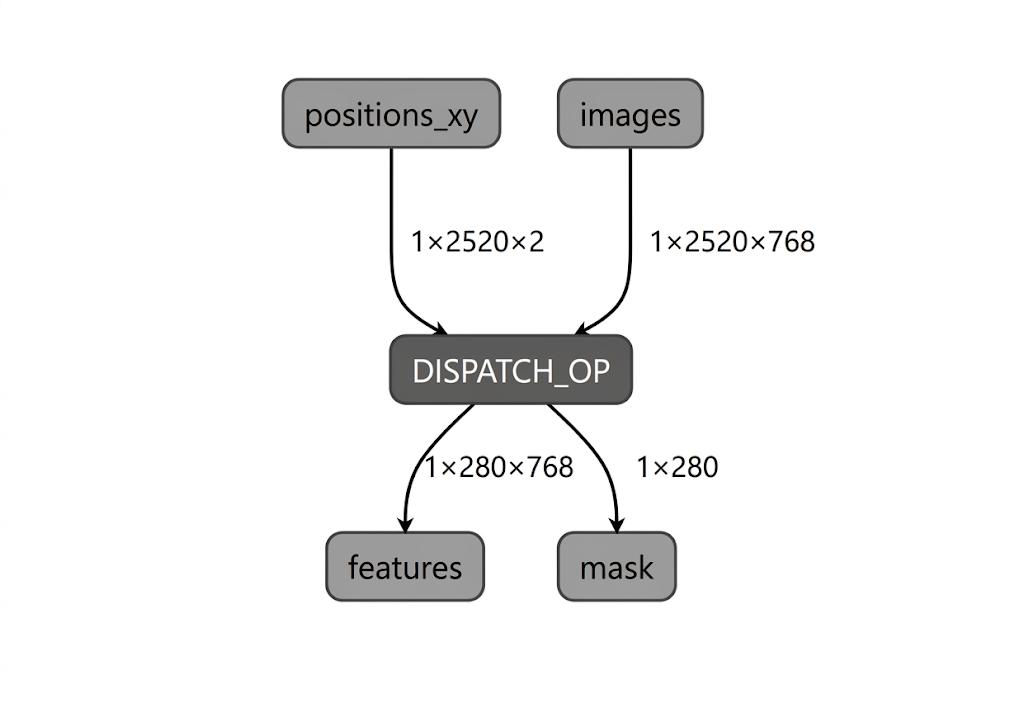
The LiteRT apply_plugin_main utility (apply_plugin_main.exe) is the AOT compilation utility that you can use for this purpose. A sample usage of the utility on Intel platform:
.\apply_plugin_main.exe -cmd apply --model="C:\models\model.tflite" -o C:\models\model_aot.tflite --soc_model=PTL --soc_manufacturer "IntelOpenVINO" --libs C:\litertlibs
Please note that the default underlying NPU compiler, which is included in the binary distribution of the Intel OpenVINO SDK, is utilized for Intel Core Ultra Series 2 and subsequent SoCs. If a model is being compiled for an NPU not on the supported list, the compiler type must be explicitly specified (though this remains optional for Intel Core Ultra 2 and higher).
set IE_NPU_COMPILER_TYPE=PLUGIN
JIT vs. AOT Compilation in your application
To compile models in your own LiteRT application, there are two approaches: AOT compilation that we already introduced, and Just-in-time (JIT) compilation.
With AOT compilation, the mode is compiled offline before deployment and can be saved for later usage — commonly used when compilation is too resource-intensive to run on-device. It does not need to be done on the same device that you are deploying the model. An example of AOT compilation in your code:
void AotCompileForOpenVINO() {
  auto run = std::make_unique<ApplyPluginRun>();

  // Full pipeline: partition → compile → embed bytecode in .tflite
  run->cmd = ApplyPluginRun::Cmd::APPLY;

  // Path to directory containing LiteRtComplilerPlugin.dll
  run->lib_search_paths.push_back("/path/to/plugin/dir/");

  // Input model
  run->model.emplace("model.tflite");

  // Intel OpenVINO target
  run->soc_manufacturer.emplace("IntelOpenVINO");
  run->soc_models.push_back("PTL");  // or "LNL"

  // Output stream for the AOT-compiled model
  std::stringstream compiled_output;
  run->outs.push_back(compiled_output);

  // Run AOT compilation
  auto status = ApplyPlugin(std::move(run));
  // compiled_output now contains .tflite with embedded OpenVINO bytecode
}
The way to inference with an AOT-compiled model:
void RunAotCompiledModel() {
  auto env = litert::Environment::Create({}).value();

  // Load AOT-compiled model, still must specify NPU accelerator
  auto compiled_model = litert::CompiledModel::Create(
      env, "model_aot.tflite", litert::HwAccelerators::kNpu).value();

  auto input_buffers = compiled_model.CreateInputBuffers().value();
  auto output_buffers = compiled_model.CreateOutputBuffers().value();

  input_buffers[0].Write<float>({/* data */});
  compiled_model.Run(input_buffers, output_buffers);
}
The alternative approach is to JIT compile the model at runtime on the device. It is more flexible: it only requires a single backend-agnostic model file.
// Create environment
auto env = litert::Environment::Create({}).value();

// JIT compile for NPU
auto compiled_model = litert::CompiledModel::Create(
    env, "model.tflite", litert::HwAccelerators::kNpu).value();

// Create I/O buffers
auto input_buffers = compiled_model.CreateInputBuffers().value();
auto output_buffers = compiled_model.CreateOutputBuffers().value();

// Fill inputs
input_buffers[0].Write<float>({/* input data */});

// Run inference
compiled_model.Run(input_buffers, output_buffers);
Benchmark with benchmark_model
LiteRT benchmark_model utility (benchmark_model.exe) is specifically designed for benchmarking an AOT-compiled model on NPU, and can be used to compare the performance against the CPU backend (XNNPack) in LiteRT. Example command for benchmarking an AOT-compiled model on Intel NPU:
.\benchmark_model.exe --graph=C:\models\model_aot.tflite --use_npu=true --compiler_plugin_library_path=C:\litertlib --dispatch_library_path=C:\litertlib --compiler_cache_path=C:\models
Accuracy check with npu_numerics_check
The npu_numerics_check utility is used to verify the numerical accuracy of an NPU-compiled model against a baseline (typically the CPU backend, XNNPack). This step is crucial for ensuring that the delegation to the NPU does not introduce unacceptable numerical deviations that could impact model quality.
Run numerics check The utility requires the AOT-compiled model and compares its outputs against the original, non-delegated model run on the CPU.
.\npu_numerics_check.exe --npu_model=C:\models\model_aot.tflite --cpu_model=C:\models\model.tflite --dispatch_library_path=C:\litertlib
Next steps
- Start with the unified NPU guide: NPU acceleration with LiteRT
- Follow the conversion and deployment steps there, choosing Qualcomm where applicable.
- For LLMs, see Execute LLMs on NPU using LiteRT-LM.